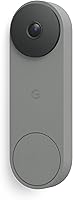
Battery vs Wired Ring Doorbell: Which to Choose? (November 2026)
Pick a wired Ring Doorbell if you have doorbell wiring and want nonstop power; pick a battery model if your door has no wires. The battery vs wired Ring Doorbell choice comes down to your wiring, your Wi-Fi and how often you want to charge a pack.
On this page (9 sections)
Pick a wired Ring Doorbell if your door already has wiring and you want nonstop power. Pick a battery model if there are no wires and you can live with charging a pack now and then.
The battery vs wired Ring Doorbell choice is mostly about your door, your Wi-Fi and how much upkeep you will tolerate.
Wired means the doorbell draws from the same electricity that runs your home. Battery means it runs on a rechargeable pack you remove and charge.
Both record video and let you talk to visitors, so the split is about power and installation, not whether the doorbell works.
The Ring Wired Doorbell 2K is the clear pick for most people who have wiring, because it removes the charging routine completely. Battery owners should budget for a spare pack from day one.
This comparison walks through the points that actually decide the choice.

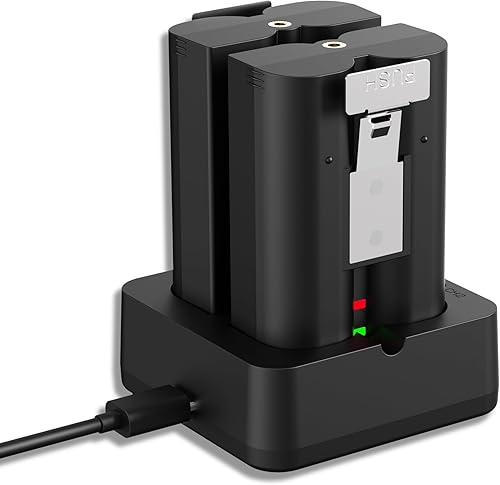 Best backup for battery models
Lesaps 2-Pack 7200mAh Replacement Battery for Ring
Battery vs wired Ring Doorbell: which one should you buy?
Buy wired if you have doorbell wiring; buy battery if you don't. Everything else in this comparison follows from that one fact about your front door.
Check the wall beside your door for a doorbell button and a small transformer, usually in a closet or near the electrical panel. A working chime and a button are decent signs the wiring is there.
If you find nothing, a battery model saves you an electrician's visit.
It also helps to know what the wiring feeds. A wired doorbell runs on low voltage from a transformer that steps household current down.
If the transformer is old or undersized, a modern wired doorbell may not get enough power to behave reliably. That is why the Ring Hardwired Transformer exists, with a 16V 30VA output and a 120V AC 60 Hz input to replace most North American units.
Our comparison of the Nest Doorbell Wired vs Battery covers the same trade-off in Google's lineup. The logic carries over: wiring decides more than any spec sheet.
The two side by side
The wired model brings constant power and sharper video, while the battery models bring placement freedom. Here is how they line up on the things buyers care about.
| Feature | Ring Wired Doorbell 2K | Battery Ring (with spare pack) |
|---|---|---|
| Power | Home electricity | Rechargeable 7200mAh pack |
| Charging routine | None | Swap and recharge packs |
| Installation | Needs existing wiring | Screws, no wiring |
| Video | Retinal 2K, up to 6x Enhanced Zoom | Varies by model |
| Placement | Near the existing wires | Anywhere in Wi-Fi range |
| Outages | Stops without power | Keeps running on its pack |
| Recording | Ring Protect plan sold separately | Ring Protect plan sold separately |
The table shows the shape of the decision. Wired wins on upkeep and video, battery wins on where you can mount it.
Neither changes the subscription question, since both need a Ring Protect plan for saved recordings and smart alerts.
The spare pack column is the part people underestimate. A single pack means the doorbell is offline while it charges.
A two-pack kit like the Lesaps set, with its dual charging station, keeps one pack in the door and one on the charger. The Ring Quick Release Battery Pack adds a quick-release tab so you can swap without moving the device, but it ships as one pack, so a second is needed for true backup.
Power and upkeep decide most of it
Wired power removes the charging chore; battery power adds a small recurring task. Pick based on how you feel about swapping a pack every few weeks.
The Ring Wired Doorbell 2K connects right into the same electricity that powers your home. There is no pack to remove, no charger to store and no downtime while a battery tops up.
That is the biggest practical gap between the two.
The trade-off is that a wired doorbell stops when the power does. A battery model keeps running through an outage because it carries its own pack, though your Wi-Fi and router still need electricity for alerts and live view.
So the "always on" advantage of wired is real but conditional on the grid.
What charging a battery doorbell really involves
A battery doorbell runs until the pack drains, then you take the pack out and put it on a charger. The Lesaps kit includes two 7200mAh 3.6V Li-ion packs and a dual charging station, so one pack can stay in the door while the other charges.
The station charges both packs at once, and the LED lights turn green when each one is full.
Those packs are rated for repeated charging and discharging without harm, which suits the swap cycle. The charger takes any 5V USB source, so a PC, car charger or power bank works, and each pack also has a built-in micro-USB port for charging on its own.
Plan on a spare pack if you want to avoid gaps in coverage.
Our guide on how to charge a Ring Doorbell battery covers the routine in detail. The short version is that a spare pack turns a multi-hour wait into a two-minute swap.
Installation and wiring
Wired takes more work up front and less later; battery takes minutes to mount and more attention over time. Choose by whether the wiring already exists.
The Ring Wired Doorbell 2K needs usable doorbell wiring at the mounting spot. If the transformer is old or weak, the Ring Hardwired Transformer replaces most North American units and gives a 16V 30VA output.
It comes with the tools for installation. Work on 120V wiring is best left to an electrician.
A battery doorbell mounts with screws and needs no wiring. That makes it the easier choice for a rental, a metal frame or a door where running a wire would mean cutting into a wall.
When a transformer upgrade makes sense
A wired doorbell that keeps dropping offline or acting oddly on an old transformer is the usual candidate for a fresh unit. The Ring Hardwired Transformer is built for Ring Wired Video Doorbells and replaces underpowered transformers.
It measures about 2.34 by 2.55 by 1.92 inches, so it fits where most old units sit.
The transformer does not touch the doorbell's video or smart features. It only fixes the power supply.
If your wiring and chime already work well, skip it and spend the money elsewhere. If the chime hums, the doorbell reboots or the button feels sluggish, the transformer is the first thing to check.
Do not open a 120V circuit unless you are comfortable doing so. An electrician can swap the transformer quickly and check the chime wiring at the same time.
That is also the moment to confirm the doorbell gets the voltage it needs before you mount it.
Video quality and features
The wired Ring Wired Doorbell 2K leads here, with Retinal 2K video and up to 6x Enhanced Zoom. Battery models vary, so check the exact model before you compare video.
The Ring Wired Doorbell 2K offers Retinal 2K with up to 6x Enhanced Zoom. It also gives Live View, Two-Way Talk, real-time motion alerts and Alexa support.
You can hear custom notifications on an Echo Dot and pull up video on an Echo Show. The enhanced zoom lets you tighten the frame from a wide view to a closer look without losing the crisp 2K detail.
Battery models run the same app and the same alerts, but the pack limits how much they can do. Check the exact model's video specs rather than assuming every battery Ring matches the wired unit.
Our comparison of the Ring Battery Doorbell Plus vs Pro shows how much the battery models differ from each other.
What the subscription adds
Both power types need a compatible Ring Protect subscription for saved recordings, video history and AI-powered alerts. Ring sells the plan separately.
Without it, you still get live view and two-way talk, but you cannot scroll back through what you missed. The subscription is the same requirement on either power type, so it should not sway the wired vs battery call.
Placement and Wi-Fi
Battery wins on placement, because the doorbell does not need a wire at the mounting spot. That freedom matters more than people expect.
A battery doorbell can go wherever the Wi-Fi signal is strong enough. That could be a side gate, a back door or a spot the old wired button never reached.
You can move it later without an electrician.
A wired doorbell stays near the existing wiring. If the button sits at an awkward height or the wires are in a bad spot, you are stuck with that location unless you rewire.
That is fine at a standard front door, less so when you want coverage somewhere the old wiring never went.
Wi-Fi is the real limit for both
Both types need a solid signal at the door. A battery unit placed far from the router will still stutter and drop alerts.
Test the signal at the mounting spot before you commit, whichever power type you choose. Placement freedom only helps if the Wi-Fi reaches the new spot.
Battery compatibility and spares
Battery models live or die on pack compatibility, so match the spare to the exact doorbell. A pack that fits one Ring model may not fit another, and wired units take no pack at all.
The Lesaps 2-Pack fits a long list of battery Ring devices. It works with Ring Video Doorbell 2, 3, 3 Plus and 4, Battery Doorbell Plus and Pro, Stick Up Cam Battery and Solar in all generations, Stick Up Cam Pro Battery and Solar, the Spotlight Cam Battery and Solar lines, Spotlight Cam Plus Battery, Solar and Wired, Spotlight Cam Pro Battery, Solar and Wired, and Solar Floodlight.
It does not fit Ring Doorbell Pro, Pro 2 or Wired models, or any device with a non-removable battery.
The Ring Quick Release Battery Pack covers the same battery-powered devices, from Video Doorbell 2 through Battery Doorbell Pro, plus the Peephole Cam and Spotlight Cam 2K lines. The quick-release tab means you can change the pack without moving the doorbell, which is handy if the unit is screwed to a frame.
Matching the pack to your doorbell
Check your model before you buy either spare. Battery Doorbell Plus and Pro owners sit in both lists.
Wired Doorbell 2K owners need neither, because that model has no pack. If you own a plug-in or wired Ring unit, no spare pack applies.
Who should buy which?
Most people with wiring should buy the wired Ring Wired Doorbell 2K. Battery buyers should plan for a spare pack from day one.
Here is the short version for each type of home.
Buy the wired Ring Wired Doorbell 2K if...
You have working doorbell wiring and want to set it and forget it. The wired unit gives nonstop power and Retinal 2K video without a charging routine.
It suits a front door where the existing button already sits at a good height. If you are weighing Ring's models more broadly, our Ring Doorbell Pro vs Ring Doorbell comparison helps sort the wired options.
Add the Ring Hardwired Transformer only if the existing wiring proves weak.
Buy a battery model with the Lesaps kit if...
Your door has no wiring, or you rent and cannot modify the wall. The Lesaps 2-Pack 7200mAh Replacement Battery fits Ring Video Doorbell 2, 3, 3 Plus and 4, Battery Doorbell Plus and Pro, and the battery Stick Up and Spotlight cams.
The dual station keeps a spare ready so the door rarely goes offline. The built-in circuit protection guards against overcharge, overload and short circuits, which matters when packs sit on a charger for long stretches.
The Ring Quick Release Battery Pack is the safe spare if you want Ring's own part. Its quick-release tab lets you swap the pack without moving the doorbell.
One pack is not enough for true backup, so buy two if you go this route.
The verdict
The wired Ring Wired Doorbell 2K wins for most readers who have wiring, because nonstop power removes the one recurring chore of doorbell ownership. The battery vs wired Ring Doorbell decision still favors battery for doors without wires, rentals and spots the old button never reached.
Go wired when the wiring exists and you want the sharper video and the do-nothing power setup. Go battery when the wall is closed to you and you will keep a spare pack charged.
In that case, the Lesaps kit or Ring's own pack turns a chore into a two-minute swap.
If you are still weighing Ring's battery models against each other, read our Ring Battery Doorbell Plus vs Pro comparison before you buy. It helps you match the pack to the exact doorbell you choose.
Frequently asked questions
Does a wired Ring Doorbell need a subscription?
No. A wired Ring Doorbell works for live view and two-way talk without a subscription.
Recording, history and AI-powered alerts need a compatible Ring Protect plan, which Ring sells separately.
How long does a battery Ring Doorbell last on one charge?
It depends on how much motion it sees and how often you open Live View. Cold weather and busy sidewalks drain a pack faster.
Keeping a second pack on a charger means you swap it in minutes instead of waiting.
Can I convert a battery doorbell to wired power?
Not by adding wires to a battery model alone. Battery and wired Ring Doorbells are separate products.
If your door has usable wiring, buy a wired model rather than trying to adapt a battery one.
Is a wired Ring Doorbell harder to install?
It takes more work than hanging a battery unit. A wired doorbell connects to existing doorbell wiring and, if the transformer is weak, may need a new one.
A battery model mounts with screws and needs no wiring at all.
Do wired Ring Doorbells work during a power outage?
No. A wired doorbell draws from home electricity, so it loses power in an outage.
A battery model keeps running because it carries its own pack, though your Wi-Fi and router still need power.