Ring Video Doorbell 4 Review: Worth It? (November 2026)
The Ring Video Doorbell 4 suits renters and busy front doors because it needs no wiring and gives you a second look before you answer. Skip it if you want a chime in the box or a wide view of your porch.
On this page (9 sections)
- The Ring Video Doorbell 4 at a glance
- Who the Ring Video Doorbell 4 suits best
- The specs that matter in daily use
- Setting up the Ring Video Doorbell 4
- Living with the Ring Video Doorbell 4 day to day
- Care and battery upkeep
- The trade-offs to weigh
- Alternatives to the Ring Video Doorbell 4
- Verdict: should you buy the Ring Video Doorbell 4?
The Ring Video Doorbell 4 suits renters and busy front doors because it runs on battery and needs no wiring. Its headline trick is the Pre-Roll buffer, which shows you the seconds before a motion event, so you get a better look at who walked up.
Skip it if you want a chime in the box or a wide porch view. Read on for what this ring video doorbell 4 review covers, how it fits real front doors, and which alternatives make more sense for your setup.
The Ring Video Doorbell 4 at a glance
The Doorbell 4 is a battery-powered camera with a pre-event buffer, and that buffer is the reason to pick it over Ring's older battery models. Ring positions it in the middle of its battery lineup, above the base battery doorbell and below the Battery Doorbell Pro.
The buffer works by keeping a short rolling clip in memory while the camera is awake. When motion trips the sensor, the recorded event starts a few seconds before the trigger moment.
In practice that means the footage opens on the approach to your door rather than on the back of someone walking away.
eufy Security Video Doorbell Add-On Chime: Best for hearing the bell indoors
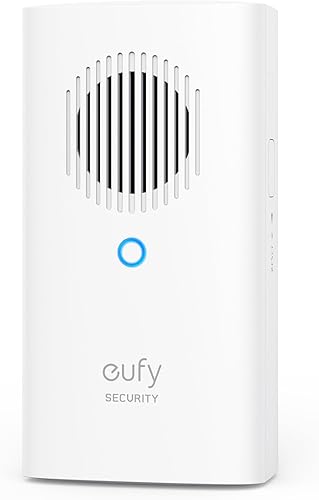
- Works with eufy Video Doorbell E340/C30/C31
- Plug-in indoor chime
- 8 ringtones
- 2.4 GHz Wi-Fi only
- microSD storage up to 128 GB
A plug-in chime that fills the house with a real ring tone when someone presses your button. It also stores doorbell footage on a microSD card, so clips survive if the camera is lost or damaged.
Pros
- A real chime tone in the house, not just a phone buzz
- Adjustable volume and 8 ringtones
- Local microSD storage for doorbell clips
Cons
- Only pairs with eufy Video Doorbell E340, C30 or C31
- 2.4 GHz Wi-Fi only
Ring sells its own chime as a separate accessory, so the box doesn't include one. That's the first thing to plan for if you're moving from a wired bell and expect a real tone in the hallway.
The camera itself mounts on a bracket and runs on its own cell, so no electrician is involved at any point.
The battery design also sets the rhythm of ownership. Instead of wiring the bell into the house current and forgetting it, you'll take the cell out and charge it on a schedule.
That's the price you pay for a no-wiring install, and it's the main thing to weigh before you commit.
When the Ring Video Doorbell 4 makes sense
Choose it if you rent and can't drill or wire a new bell, or if your front door already has a good Wi-Fi signal and you want a camera without an electrician.
It also suits homes where packages go missing. The pre-event footage and the motion alerts give you a look at the porch between visits, which is more than a peephole or a plain push button offers.
One more case fits well: a door with no existing chime at all. If the house never had a wired bell, a battery doorbell plus a separate chime is a complete solution without cutting into walls.
Who the Ring Video Doorbell 4 suits best
This doorbell suits renters, apartment dwellers and anyone with a porch that gets steady foot traffic. It's also a sensible first camera for a household that already uses the Ring app, since everything lands in one place.
It's less of a fit if your front door is a long walk from the router. A weak signal at the doorway causes late alerts and stuttering live view, and no camera setting fixes that.
If the signal is marginal, a mesh node or a Wi-Fi extender placed near the door is worth budgeting for before you buy the camera.
Think about how often you're home. If deliveries land while you're at work, cloud video clips matter, and that means a Ring plan on top of the hardware.
If someone is usually home, live view and the app alerts cover most of what you need.
Also consider the people who visit. A household that gets frequent callers, from couriers to family, benefits from the pre-event buffer more than a quiet door that sees one visitor a week.
The busier the threshold, the more the buffer and the alerts earn their keep.
The specs that matter in daily use
The spec that shapes daily life most is the battery, because you'll recharge it. Ring lists a long published range, but that number assumes light activity.
A street-facing door with passing cars and pedestrians records more events and drains the cell faster.
The Pre-Roll buffer is the other spec worth understanding. It captures a short burst of video before the main recording starts, which is why you often see the moment someone steps onto the porch rather than catching them mid-knock.
The catch is that the buffer only runs when the camera is already awake, so frequent triggers keep it ready but also cost power.
Night vision and two-way talk round out the everyday features. You can see a visitor after dark and speak to them from your phone, which covers the bulk of front-door moments.
Two-way talk matters most for delivery instructions, where a short spoken sentence beats typing on a phone.
Mounting matters too. The battery model hangs on the wall with screws or an adhesive mount, so you can position it at a height that frames faces rather than hat brims.
A bracket that tilts the camera down slightly helps when the door sits above a step or a slope.
Setting up the Ring Video Doorbell 4
Setup starts with the Ring app and a charged battery, so charge the cell fully before you mount anything. The app walks you through joining your Wi-Fi network and scanning the code on the doorbell.
Mount the bracket at your chosen height, then clip the doorbell in place. Check live view from where you'll stand to answer; if faces land too high or low, move the bracket before you commit to the screws.
Test the motion zones in the app. Narrow the zone to your walkway so passing cars don't trigger alerts and wear down the battery.
That single step does more for battery life than any other setting. A zone that includes the sidewalk or the street will fire on every passer-by and keep the camera awake far longer than it needs to be.
If your existing chime won't ring with the battery model, pair a Ring chime so you hear callers indoors. The Ring Battery Doorbell Plus review covers the model above this one if you're weighing the step up.
One setup detail people miss: the order you pair things. Set up the doorbell first and confirm alerts reach your phone before you add a chime or a smart speaker.
That way you know the camera and network are working, and any later problem sits with the accessory rather than the doorbell.
Living with the Ring Video Doorbell 4 day to day
Day to day, the doorbell is mostly phone alerts and quick glances at the app. A motion event pings you, and you can open live view to see who's there before you decide to answer or ignore.
The pre-event footage earns its keep when a visitor moves fast. Instead of a clip that starts as they turn away, you get the seconds before, so you can see the face and what they carried.
For a porch where parcels go missing, that extra glimpse is often the difference between a useful clip and a useless one.
Two-way talk is clear enough for delivery instructions. You can tell a courier where to leave a parcel without opening the door, which helps when you're out or tied up.
It also lets you answer without opening, which is a small security gain for anyone who lives alone.
Saved clips need a Ring plan. Without one you still get live view and alerts, but you can't scroll back through yesterday's porch activity.
Factor that ongoing cost into your decision. If you only care about live moments, the free tier covers you; if you want a record, budget for the plan from the start.
Care and battery upkeep
Battery care is the main maintenance job. Recharge when the app warns you, and keep a spare cell if your door sees heavy traffic so you're never offline while one charges.
Swapping a spare in takes moments and keeps the camera live through the recharge cycle.
Clean the lens with a soft cloth now and then. Dust and spider webs near the camera blur the picture and can trigger false motion alerts, especially at night when the infrared light catches them.
A quick wipe every few weeks is usually enough.
Check the mount screws each season. A doorbell that shifts in the bracket frames the porch at an angle and can loosen over time in wind or with repeated door slams.
A wobbly mount also adds false triggers, since the camera sees its own movement.
Keep the app and firmware current. Ring pushes updates that can improve motion detection and power use, so accept them when they appear.
Check the battery level in the app after an update, since a firmware change can shift how aggressively the camera watches for motion.
The trade-offs to weigh
The honest trade-off is that the Doorbell 4 leaves the chime out and pushes saved video behind a plan. Ring sells the chime separately, and without a subscription you can watch live but not review past clips.
That's two separate add-on costs sitting on top of the camera price, and they're easy to forget when you compare it to a wired bell that rings out of the box.
Battery life is the second consideration. The published range looks generous, but a busy street or wide motion zones bring recharges more often than the headline number suggests.
Power-saving settings help, at the cost of catching fewer events. You end up tuning the camera toward either coverage or convenience, rarely both.
It's also not the widest or sharpest camera in Ring's lineup. If a full porch view matters, the Ring Battery Doorbell Pro review covers the model with the better field of view.
The base battery model costs less but gives up the pre-event buffer, so the Doorbell 4 sits in a narrow middle where the buffer is the main reason to pay more.
Alternatives to the Ring Video Doorbell 4
The right alternative depends on what the Doorbell 4 leaves out for you. Each option below solves a different gap, so pick by the need that matters most at your door.
None of them is a straight upgrade across the board, so weigh the gap you actually feel.
{{product B0CJC7WJYL | A plug-in chime that rings indoors and stores clips locally.}}
This eufy chime fills the gap the Doorbell 4 leaves in the hallway. It pairs only with the eufy Video Doorbell E340, C30 or C31, so it's the pick if you're building around an eufy doorbell rather than a Ring one.
It runs on 2.4 GHz Wi-Fi and stores footage on a microSD card you supply, up to 128 GB. That local storage is the part worth noting: clips sit on the card in your home, so they survive even if the doorbell itself is damaged or lost.
It plugs into a wall socket and connects over 2.4 GHz Wi-Fi only, so a 5 GHz network won't work with it. Setup is a few taps in the app once it's plugged in and online.
You get eight ringtones and an adjustable volume, so you can set a tone you'll actually notice from the back of the house. If your front door is a Ring setup, this chime won't pair, so treat it as the option for a eufy door.
Ring's battery lineup versus Wyze
If you're not set on Ring, compare brands before you buy. The Ring vs Wyze doorbell comparison sets the two side by side on wiring, storage and app features.
A Wyze Battery Video Doorbell review covers the budget end of the market if price drives your choice. The comparison is the better starting point, since it lays out where the two brands differ on storage and plans rather than just listing specs.
Verdict: should you buy the Ring Video Doorbell 4?
Buy the Ring Video Doorbell 4 if you rent or can't wire a bell and you want pre-event footage at the door. It's the sensible middle of Ring's battery range, and the buffer is the feature that separates it from the cheaper base model.
Skip it if you want a chime in the box or the widest porch view, and look at the Battery Doorbell Pro instead. If you're already in the Ring app and your door gets regular foot traffic, this is the model to start with.
Just budget for the chime and the plan up front so the ongoing cost doesn't surprise you later.
Frequently asked questions
Does the Ring Video Doorbell 4 need a subscription?
No. It records and alerts without one, but saved video clips sit behind a Ring plan.
Without a plan you can still watch live and answer the door from your phone, so the subscription only matters if you want to review past footage.
Will the Ring Video Doorbell 4 work with an older mechanical chime?
It runs on its own battery, so it doesn't need your existing doorbell wiring or chime. Ring sells its own plug-in chime as a separate accessory.
If you want the old mechanical bell to ring, check Ring's compatibility guidance for your chime model before you buy.
How long does the Ring Video Doorbell 4 battery last?
It depends on how many events it records. Ring's power-saving settings stretch it toward the longer end of Ring's published range, while a busy street with constant motion cuts it short.
Expect to recharge more often in high-traffic homes.
What happens to the Ring Video Doorbell 4 when the internet drops?
The camera keeps its settings but can't send alerts or record to the cloud until your Wi-Fi returns. Any saved footage is unavailable while offline.
A separate chime on the same network also stops working, so plan for how you'll hear callers during outages.
Can I use the Ring Video Doorbell 4 without a smart speaker?
Yes. Alerts land on the Ring app on your phone, and you can talk to visitors through the app.
A smart speaker or a Ring chime just makes the bell easier to hear when your phone isn't nearby.
Is the Ring Video Doorbell 4 good for apartments?
It fits an apartment front door well because it runs on battery and needs no wiring. Check the building's rules on door cameras first, and confirm your Wi-Fi reaches the doorway strongly enough for reliable alerts and live view.


