9 Best Doorbell Cameras for Elderly Users (November 2026)
The best doorbell cameras for elderly users include the ieGeek Video Doorbell Camera Wireless (best overall), the Google Nest Doorbell for familiar brand support, and the eufy Video Doorbell E340 for package watchers.
On this page (8 sections)
- The best doorbell cameras for elderly users by need
- How these doorbell cameras compare
- How we compared these doorbell cameras for elderly users
- Which doorbell camera is easiest for an older person to use?
- Do you need a subscription for a doorbell camera?
- What should you check before you buy a doorbell camera?
- How much of the doorstep should the camera see?
- The verdict: which doorbell camera suits an elderly user?
The best doorbell camera for elderly users is the ieGeek Video Doorbell Camera Wireless, which shows the whole doorstep in one 2K head-to-toe frame and stores footage without a monthly fee. For anyone who prefers a screen or chime indoors, the SwitchBot and MeshSear picks ring inside the home with no phone in hand.
A doorbell camera helps an older resident in three ways: it lets them see who is outside before opening the door, it starts a conversation from the couch, and it gives a family member a way to check in. The right pick depends on how comfortable the person is with a phone.
The list below starts with the strongest all-around model and then matches each option to a specific need, such as a big screen, a package view or a simple indoor receiver.
Our picks at a glance
-
1

-
2

-
3

- 4
 Check it
MeshSear Wireless Video Doorbell Camera with Receiver
Best for a simple chime-in-the-box setup - 5
 Check it
Wyze Wireless Duo Cam Doorbell
Best for budget dual views - 6
 Check it
Chamberlain myQ Video Doorbell
Best for Chamberlain garage owners - 7
 Best for discreet night checksCheck it
- 8
 Check it
SwitchBot 2K Doorbell Camera with Monitor
Best for a screen by the door - 9
 Check it
Wireless Smart Video Doorbell System, 7-Inch Touchscreen
Best for the largest screen
The best doorbell cameras for elderly users by need
The top pick covers most homes, while the rest win on one job: a screen indoors, a package view, a wide night image or a low price. Match the camera to how the resident will actually answer the door.
ieGeek Video Doorbell Camera Wireless: Best overall
- 2K 3MP 180° head-to-toe view
- No subscription required
- 5200mAh battery, about 2 months at 20 triggers a day
- 2.4GHz WiFi only
One wide image covers visitors head to toe, so a helper sees who is there without scrolling between views. Local storage keeps the monthly cost at zero.
Pros
- No subscription needed
- Head-to-toe 180° view
- 2-year warranty and 24/7 support
Cons
- Works only on 2.4GHz WiFi
- Battery is built in and not removable
The ieGeek fits a home where one person manages the app and others just need to see and talk. Its 180° head-to-toe view frames a tall visitor and a package on the step in a single 2K picture, so nobody has to tilt the camera or scroll between views.
The lens offers both a 1:1 normal image and a fisheye view, and night vision keeps the feed clear after dark.
It runs on a built-in 5200mAh battery with about 2 months of use at 20 triggers a day, and it saves clips to a memory card up to 128GB or to free basic cloud storage. There is no subscription, which keeps the monthly bill at zero.
The included chime works for 60 days on its AAA batteries before they need replacing.
Motion zones pull alerts away from the road and driveway, so a quiet street stays quiet. It connects on 2.4GHz WiFi only, and ieGeek backs it with a 2-year warranty and 24/7 support.
Choose it as the default for a porch that needs one clear view and no fees. If the resident answers on an indoor screen instead of a phone, keep reading.
Google Nest Doorbell: Best for familiar brand support
- Wired install
- 24/7 streaming with a Nest Aware plan
- Person alerts
- HDR video with night vision
Person alerts separate a visitor from a passing car, which cuts the noise for someone who checks their phone often. The 4:3 frame shows people head to toe and packages near the ground.
Pros
- Person alerts cut false triggers
- HD talk and listen
- Crisp HDR video at night
Cons
- Recording needs a Nest Aware plan
- Runs on the Nest app, not Google Home
The Nest Doorbell suits a household already comfortable with Google products and willing to pay for a Nest Aware plan. Its person alerts tell a visitor apart from a passing car, which cuts the number of alerts that pull someone to their phone.
The 4:3 frame shows people head to toe and packages on the ground, and HDR video with night vision keeps the image bright after dark. HD talk and listen allows a full conversation, and prerecorded messages answer the door when nobody can come to it.
A 15 degree wedge is included to angle the lens toward the walkway.
The trade-offs matter here: it is a wired install with a chime connector in the box, and recording needs a Nest Aware subscription sold separately. It runs on the Nest app and is not compatible with the Google Home app.
A 3-hour snapshot history is viewable without a plan.
Pick it when a familiar brand and person detection are worth the plan. Skip it if the home has no doorbell wiring or wants zero monthly cost.
eufy Video Doorbell E340: Best for package watchers
- Dual cameras for people and packages
- 2K FHD video
- 8GB built-in storage, no subscription
- Battery or wired install
A second downward camera shows what is sitting on the step while the main lens frames the visitor. Footage is saved to 8GB built into the unit, so no plan is needed.
Pros
- Clear package view
- No monthly fee
- Battery swaps in seconds
Cons
- Only 2.4GHz WiFi
- Needs a HomeBase or chime for whole-home alerts
The eufy E340 suits a home that gets a lot of deliveries. A second camera points down at the doorstep, so the person who checks the feed sees both the visitor and whatever is sitting on the mat.
The 8GB of built-in storage records without a plan, which saves the yearly fee a cloud service would add. It installs on a quick-release battery that swaps in seconds, or on 16–24V wiring that keeps the battery topped up.
A 15 degree mount adapter is included to aim the view.
Color night vision with a dual-light system shows a clear view to about 16 ft in the dark. For indoor alerts, pair it with eufy HomeBase units, a Minibase Chime, or Alexa and Google devices, since the doorbell itself relies on one of those for whole-home ringing.
It also takes Quick Replies for times when nobody is at the door.
Choose it for parcels and a no-fee setup. It works on 2.4GHz WiFi only, so check the router before you buy.
Our dual camera video doorbell guide covers more models with this layout.
MeshSear Wireless Video Doorbell Camera with Receiver: Best for a simple chime-in-the-box setup
- Receiver in the box
- AI human detection
- 720P video
- Four IR LEDs for night vision to 33 ft
An indoor receiver rings inside the home without a phone nearby, so a visitor never goes unnoticed. Human detection filters out pets and passing cars.
Pros
- Indoor receiver included
- Human detection limits false alerts
- Two-way talk from the app
Cons
- 720P is the lowest resolution here
- Cloud storage is the main recording option
The MeshSear is the simplest pick here because an indoor receiver comes in the box. It rings inside the home with no phone nearby, so a visitor is never missed while the resident is in another room.
AI human detection filters out pets and passing vehicles, which keeps the chime and phone alerts focused on real visitors. Four infrared LEDs give night vision to 33 ft, and the 5200mAh battery runs for long stretches between charges with the included USB cable.
A pre-record preview captures the moment before motion fully registers.
The 720P resolution is the lowest in this roundup, so faces are less detailed than on the 2K models. Recording leans on cloud storage rather than a memory card, which matters if the resident wants everything saved locally.
Setup uses screws and the app, with two-way talk handled from the phone.
Pick it for a resident who wants a loud indoor ring and a simple setup, and accept the softer image as the trade. For sharper video, move up to one of the 2K picks.
Wyze Wireless Duo Cam Doorbell: Best for budget dual views
- Two cameras for people and packages
- 2K video with color night vision
- Wi-Fi chime included
- 2.4GHz and 5GHz WiFi
Two camera views plus a chime in the box cover a porch and its packages without extra buys. The doorbell joins either 2.4GHz or 5GHz WiFi.
Pros
- Chime included
- Works on 5GHz WiFi
- Local recording to a memory card
Cons
- App setup takes more steps than the top pick
- Weather rating is IP65, below the leaders
The Wyze Duo Cam is the budget route to two views. One camera frames people and a second watches the doorstep, so package alerts arrive with the visitor alerts.
A Wi-Fi chime is included, which means indoor ringing works without a separate buy. The removable 6200mAh battery lasts up to 6 months on a charge, and the doorbell joins either 2.4GHz or 5GHz WiFi, a rare feature in this group.
A memory card up to 512GB handles local recording, or a Cam Plus plan adds cloud storage. Motion-activated voice deterrence plays a prompt when someone approaches.
The starlight sensor keeps color in low light, and the camera works with Alexa, Google Assistant and IFTTT.
Choose it when two views and a chime need to fit a tight budget. The app setup takes a few more steps than the top pick, and the IP65 weather rating sits below the leaders here.
Chamberlain myQ Video Doorbell: Best for Chamberlain garage owners
- 2K video, 150° wide view
- Color night vision
- Battery or wired install
- USB-C recharge
A wide 150° lens and 2K video keep the whole entry in frame, and the doorbell fits a home already using the myQ app for its garage. Face alerts come with a monitoring plan.
Pros
- Wide 150° view
- Battery or wired install
- Fits the myQ app
Cons
- Smart face alerts need a paid plan
- Fewer local storage options
The myQ Video Doorbell fits a home already using the myQ app for its garage door. One app then covers the garage and the front door, which is easier for a resident who does not want a second login.
The 2K video and 150° wide-angle lens keep the entry in frame, and color night vision holds up in low light. It installs on battery or wiring, and the battery recharges over USB-C after it comes off the mount.
The mount plate and hardware come in the box.
Face alerts and custom monitoring zones come with a Video Monitoring Plan sold separately, so the smartest alerts need a fee. Local storage options are limited compared with the memory-card models here.
The metal and plastic housing is built to handle extreme temperatures.
Pick it for a Chamberlain garage owner who likes one app. Otherwise the ieGeek or eufy gives more storage choices without a plan.
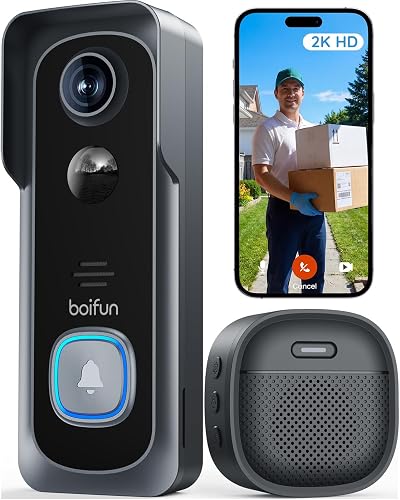
BOIFUN 2K Video Doorbell: Best for discreet night checks
- 2K HD, 166° field of view
- No subscription for core features
- Invisible 940nm IR night vision to 10 meters
- 5200mAh battery, up to 60 days in lab tests
The 166° lens covers the porch, and the invisible infrared light shows a night visitor without a red glow. Core alerts, talk and playback stay free.
Pros
- No subscription for core features
- Invisible night light
- Anti-theft alarm
Cons
- Battery is not removable
- Works only on 2.4GHz WiFi
The BOIFUN suits a porch where a glowing red light at night would bother a neighbor or the resident. Its invisible 940nm infrared fills the frame in the dark without a visible glow, and it reaches about 10 meters.
The 166° lens covers the entry, and the 2K sensor with an f/2.5 aperture keeps faces easy to recognize. Core features such as alerts, two-way talk, human detection and playback stay free, with an optional plan only for cloud storage and advanced AI.
An indoor chime comes in the box.
A built-in 5200mAh battery runs up to 60 days in lab conditions with 30 daily activations and 10-second clips. It records to a memory card up to 128GB and sounds an alarm if someone tries to remove it.
The flame-retardant ABS housing resists weather.
Choose it for discreet night checks and no fees. The battery cannot be removed, so plan on bringing the unit inside to charge.
SwitchBot 2K Doorbell Camera with Monitor: Best for a screen by the door
- 4.3-inch indoor color monitor
- 2K video, 165° view
- 4GB SD card included
- No subscription
An indoor screen shows and answers visitors without opening an app, and the included memory card keeps recordings free. Keep the monitor within about 5 meters of the doorbell for a steady link.
Pros
- Answers visitors on a screen
- Memory card in the box
- Pairs with SwitchBot smart locks
Cons
- Monitor needs a power outlet
- Short range between units
The SwitchBot is the pick when the resident would rather look at a screen than open an app. A 4.3-inch color monitor shows the visitor, allows two-way talk and offers quick replies, all from a panel plugged in indoors.
A 4GB memory card comes in the box for free local recording, and it takes cards up to 512GB. The 2K camera covers 165° with a 16:9 frame that shows a visitor head to toe, and color night vision works in the dark.
The monitor's menu can be switched between several languages.
It pairs with SwitchBot smart locks so the door can be opened from the monitor, and Alexa is supported. The catch is range: keep the monitor within about 5 meters of the doorbell, and add a second monitor in a larger home.
A solar panel accessory is sold separately to cut charging trips.
Pick it for a screen-first setup in an apartment or small house. Our doorbell camera with monitor guide compares more screen options.
Wireless Smart Video Doorbell System, 7-Inch Touchscreen: Best for the largest screen
- 7-inch 1080P touchscreen monitor
- No wiring or drilling
- No subscription
- 160° lens, 2.4GHz and 5GHz WiFi
The 7-inch screen is the biggest here and handles calls, live view and motion alerts on one panel. A memory card in the monitor keeps footage safe even if the doorbell is damaged.
Pros
- Large 7-inch screen
- Works on 2.4GHz and 5GHz WiFi
- No monthly fee
Cons
- 1080P is the lowest clarity for the screen size
- Monitor runs a few hours on battery
The WISDOM VIEW offers the largest screen in this group. A 7-inch 1080P touchscreen handles live view, calls and motion alerts on one panel, so everything the resident needs sits in one place.
Setup needs no wiring or drilling, and the system works on 2.4GHz and 5GHz WiFi with a signal range up to 60 meters in open space. The TF card sits inside the monitor, so recordings survive even if the doorbell is damaged.
An opening module for an electric lock is included.
The 160° lens and motion detection trigger alerts within 5 meters, with clips saved to the card and shown on the monitor or the TuyaSmart app. The 5000mAh battery runs 45 to 60 days, and the monitor lasts a few hours off the outlet.
The camera is IP55 rated for rain.
Choose it for the big screen and simple install. The 1080P image is softer than the 2K picks, so compare it with the SwitchBot if clarity matters more than size.
How these doorbell cameras compare
The table below lines up the picks on video, power, storage and the indoor ringing option, since those four points decide most of the choice. Scan the storage and screen columns first if a monthly fee or a phone-free answer matters most.
| Product | Best for | Video | Power | Storage | Our score |
|---|---|---|---|---|---|
| ieGeek Video Doorbell Camera Wireless | overall | 2K 3MP, 180° | Built-in 5200mAh battery | Micro SD up to 128GB or basic cloud | 9.5 |
| Google Nest Doorbell | familiar brand support | HDR, 4:3 frame | Wired, chime connector included | 9.2 | |
| eufy Video Doorbell E340 | package watchers | 2K FHD, two cameras | Quick-release battery or 16–24V wiring | 8GB local, no fee | 8.6 |
| MeshSear Wireless Video Doorbell Camera with Receiver | a simple chime-in-the-box setup | 720P | 5200mAh rechargeable battery | 8.4 | |
| Wyze Wireless Duo Cam Doorbell | budget dual views | 2K, two cameras | Removable 6200mAh battery | Micro SD up to 512GB | 7.8 |
| Chamberlain myQ Video Doorbell | Chamberlain garage owners | 2K, 150° | Battery or wired | 7.5 | |
| BOIFUN 2K Video Doorbell | discreet night checks | 2K, 166° | Built-in 5200mAh battery | Micro SD up to 128GB | 7.3 |
| SwitchBot 2K Doorbell Camera with Monitor | a screen by the door | 2K, 165° | 4GB card included | 7.1 | |
| Wireless Smart Video Doorbell System, 7-Inch Touchscreen | the largest screen | 1080P, 160° | TF card in the monitor | 6.8 |
Which models ring indoors without a phone?
Five picks handle an indoor ring without extra hardware. The MeshSear's receiver and the SwitchBot's 4.3-inch monitor both come in the box, and the Wyze Duo Cam includes a Wi-Fi chime.
The WISDOM VIEW's 7-inch monitor doubles as the indoor unit. The ieGeek adds a separate chime with its own AAA batteries, though the ieGeek's chime is a simpler ringer without a picture.
The Nest needs existing doorbell wiring to ring the home's chime. The eufy E340 and Chamberlain myQ can ring an existing mechanical chime when wired, or you add a eufy HomeBase or Minibase Chime, or the myQ Wireless Chime sold separately.
The BOIFUN includes an indoor chime in the box.
For a resident who wants a picture indoors, the SwitchBot and WISDOM VIEW are the only two with a screen. For a loud ring only, the MeshSear, Wyze and BOIFUN keep the cost down.
Which storage choice keeps monthly costs at zero?
Local storage decides this. The ieGeek takes a microSD card up to 128GB or uses free basic cloud clips.
The eufy E340 stores on 8GB built in. The Wyze Duo Cam takes a card up to 512GB, and the BOIFUN takes one up to 128GB.
The SwitchBot ships with a 4GB card and accepts cards up to 512GB. The WISDOM VIEW saves to a TF card inside the monitor.
The MeshSear leans on cloud storage as its main recording option.
The two exceptions are the Nest, where recording needs a Nest Aware plan, and the Chamberlain myQ, where face alerts and smart zones need a Video Monitoring Plan. Both still show live video without the plan.
How we compared these doorbell cameras for elderly users
We compared the specs that decide whether an older resident can use a doorbell camera day to day: how much of the visitor the lens captures, how alerts reach the home, whether a fee is required and how the unit gets power.
A head-to-toe view or a downward second camera means a seated resident can judge a visitor without guessing. An indoor chime or monitor matters when a phone is not close at hand, and local storage keeps the long-term cost at zero.
We also weighed battery life in triggers per day, not just months, since a busy porch drains any battery faster.
We scored each model on specs, features and how well it fits this reader, and listed them highest score first. Our wireless doorbell camera picks and the broader doorbell camera guide show the same models in a general setting.
Which doorbell camera is easiest for an older person to use?
The easiest setup puts the answer on a screen or chime indoors. A monitor or receiver model means the resident presses one button and talks, with no app in the way.
The SwitchBot's 4.3-inch monitor and the WISDOM VIEW's 7-inch touchscreen both show and answer visitors. The MeshSear's receiver rings without a screen, which is simpler still but gives no picture indoors.
The WISDOM VIEW's touchscreen handles calls, opening and live view on one panel.
For a phone-based home, the ieGeek's app handles sharing, so a family member can manage alerts and the resident just talks. Pick the screen if app use is a struggle, and the ieGeek if someone else will run the app.
Either way, set up the app and alerts for the resident before the first visitor arrives.
Do you need a subscription for a doorbell camera?
No, not for the models here that record locally. The ieGeek, eufy E340, SwitchBot, BOIFUN and WISDOM VIEW all save footage to a memory card or built-in storage without a monthly fee.
The Wyze Duo Cam also records to a card, with Cam Plus as an optional extra.
The Nest Doorbell is the exception in this group: recording and advanced alerts need a Nest Aware plan. The myQ puts face alerts behind a Video Monitoring Plan, and the eufy offers an optional plan for AI classification and longer cloud storage rather than requiring it.
For a fixed budget, a no-fee model keeps the cost predictable after the first purchase. Remember that memory cards are sold separately on most picks, so add one to the first order.
What should you check before you buy a doorbell camera?
Check the WiFi band, the power source and where the indoor alert will live. Several picks here connect on 2.4GHz only, so a 5GHz-only router needs the 2.4GHz band turned on.
The Wyze and WISDOM VIEW handle both bands, which makes them easier on newer routers.
Wiring changes the choice. The Nest is wired, while the ieGeek, eufy, MeshSear, BOIFUN, SwitchBot and WISDOM VIEW run on batteries, and the eufy can also take 16–24V wiring.
The Chamberlain myQ installs either way.
Finally, plan the indoor ring. A chime in the box (Wyze, BOIFUN, ieGeek), a receiver (MeshSear) or a monitor (SwitchBot, WISDOM VIEW) removes the phone from the daily routine.
Battery life is the last check: a removable pack suits a busy street better than a sealed one.
How much of the doorstep should the camera see?
The camera should show a visitor head to toe plus the ground where packages land. That is why the 180° ieGeek view and the eufy's second downward lens top this list for a seated viewer.
A wide lens alone is not enough if it crops the top of a tall visitor. The 4:3 Nest frame, the 16:9 SwitchBot frame and the 160–166° lenses on the WISDOM VIEW and BOIFUN all aim at the same goal.
The Wyze's dual cameras and the Chamberlain's 150° lens cover the same ground in different ways.
Mount the camera near chest height so the button is reachable and the lens still frames the face. A wide lens covers small mounting errors.
For a seated resident, a screen or chime indoors matters as much as the view outside.
The verdict: which doorbell camera suits an elderly user?
The ieGeek Video Doorbell Camera Wireless is the best doorbell camera for elderly users overall, with a 180° head-to-toe 2K view, fast alerts and no subscription. Pick the SwitchBot when an indoor screen is the priority, or the MeshSear for a simple in-home chime.
Choose the eufy E340 for deliveries, the Nest for person alerts on a wired door, and the WISDOM VIEW for the biggest screen. The Wyze Duo Cam covers dual views on a budget, and the Chamberlain myQ fits a garage owner already in its app.
Each one answers the door in a different way, and the right pick follows how the resident will actually use it.
With local storage and a clear view, a doorbell camera for an elderly user turns a knock into a calm, visible conversation from inside the home.
Our top 3 picks at a glance
-
1
-
2
-
3
Frequently asked questions
Does a doorbell camera need a smartphone to work?
Not always. Models with an indoor monitor or a receiver, like the SwitchBot and MeshSear picks here, ring and show visitors inside the home without a phone.
The app still handles setup and settings.
A chime-only model is the simplest option for someone who rarely carries a phone.
Where should a doorbell camera be mounted for an older resident?
Mount it at about chest height so the lens frames a standing visitor head to toe and the button is easy to reach. The ieGeek's 180° view and the SwitchBot's 165° view help when the camera sits a little high or low.
Keep the lens out of direct afternoon sun where possible.
How long does a battery doorbell last between charges?
The ieGeek battery lasts up to about 2 months with 20 triggers a day. BOIFUN reports up to 60 days in lab conditions with 30 daily activations.
Busy streets and frequent live viewing drain the battery faster, so look for a removable pack if swapping it often would be a hassle.
Can a family member check the camera from another home?
Yes on the ieGeek, which supports unlimited device sharing from one master account. A relative can open the live view, get alerts and talk to the visitor.
That pairing works well when the resident wants help answering the door without managing the app alone.
Do these doorbells work with voice assistants?
Several do. The ieGeek and SwitchBot take Alexa commands, while the eufy E340 works with Alexa and Google Assistant, and the Wyze adds IFTTT.
Voice is useful for checking a live feed hands-free, but the indoor screen or chime still matters for everyday ringing.


