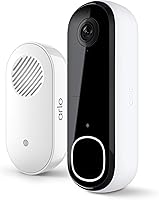
Can the Ring Battery Doorbell Be Hardwired?
No. The Ring Battery Doorbell 2K runs on its built-in battery and recharges over USB-C, so it can't be hardwired to your doorbell transformer. The only power option for this model is the battery, removed with the included tool and charged by cable.
On this page (8 sections)
- Can the Ring Battery Doorbell be hardwired at all?
- Why can't you connect it to your existing doorbell wiring?
- How do you keep a battery doorbell charged?
- Can you skip the wiring and still get a chime?
- Does a subscription change what the doorbell can do?
- How does the battery model compare with the Plus and Pro?
- Is a wired Ring doorbell the better choice for your home?
- What should you do next?
No. The Ring Battery Doorbell 2K runs on its built-in battery and recharges over USB-C, so it can't be hardwired to your doorbell transformer.
The battery is the only power source for this model, and the included removal tool lets you take it off the wall to charge.
That matters if your home already has doorbell wiring and you hoped to reuse it. The wires have nowhere to connect on this doorbell.
Planning around battery charging is the only reliable approach, and the rest of this guide covers how to do that well.
Can the Ring Battery Doorbell be hardwired at all?
No. This model has no wiring terminals for a transformer.
It ships with a built-in battery and a USB-C charging path, and that's the full power story.
Ring builds battery and wired doorbells as separate designs. A wired model connects to your existing doorbell transformer and draws continuous power.
The Battery Doorbell 2K instead asks you to detach it with the included removal tool and plug it in when the charge runs low.
The removal tool comes in the box, so the detach step needs no extra purchase. The USB-C cable is the one thing Ring leaves out, so plan on supplying your own.
So if your question is "can the Ring Battery Doorbell be hardwired," the answer is a firm no, and no adapter changes that. Buy this model for the easy placement a battery allows, not for wiring.
Why can't you connect it to your existing doorbell wiring?
The electronics expect battery voltage, not a transformer feed. Wiring a battery unit to doorbell wires would put the wrong supply into a device with no matching input.
A traditional doorbell transformer steps household power down to a low voltage for a chime circuit. A battery doorbell doesn't use that circuit.
Its power comes from the cell inside, charged separately by cable.
This design gives the doorbell a real advantage: you can mount it where wiring can't reach, such as beside a gate or on a shed wall. The trade-off is that power is your job, not the house's.
This pack fits a long list of Ring models but not the Battery Doorbell 2K, whose battery is built in. Owners of models like the Battery Doorbell Plus and Pro get the swappable version.
The pack's quick-release tab lets you change the battery without moving the device. That only works on Ring models built around the swappable pack, so the tab has nothing to grab on the Battery Doorbell 2K.
How do you keep a battery doorbell charged?
Plan on removing the doorbell and charging it over USB-C, using the included tool to detach it. The cable isn't included, so have a USB-C cable ready before the first low-battery alert.
- Watch the Ring app for the battery level and charge before it hits zero.
- Detach the unit with the removal tool, take it indoors, and connect the cable.
- Recharge fully, then reattach it to the mount.
The steps are simple, but doing them often gets old. Our walkthrough on how to charge a Ring doorbell battery covers the sequence in detail.
Can you keep a spare battery on the charger?
A spare power source changes the routine. If you own a Ring model with a swappable Quick Release pack, keep one pack on the charger while the other runs the doorbell.
A swap takes seconds, so the doorbell is never off the wall long enough to miss a visitor.
The station plugs into a standard outlet and its indicator light shows when packs are charged. It tops up one or two packs at once and Ring says it charges them nearly twice as fast as a Micro USB cord alone.
The power cord runs 6ft, and the station works in conditions from 50°F to 104°F.
That whole routine depends on owning the swappable packs, so it doesn't apply to the Battery Doorbell 2K's built-in cell. For this doorbell, the charging cable is the only path.
Can you skip the wiring and still get a chime?
Yes. The doorbell alerts your phone and pairs with wireless chimes, so you don't need doorbell wiring for sound inside the house.
The Battery Doorbell 2K sends real-time notifications to your phone when it detects motion. For an indoor chime, pair a Ring Chime or use an Alexa-enabled device.
Ring says the doorbell works with Alexa for custom notifications from an Echo Dot and video on an Echo Show.
That setup replaces the old wired chime entirely. You get a ringer in the kitchen or hallway without touching the transformer or the old chime box.
The Alexa pairing also gives you hands-free monitoring on select devices. Say you're expecting a package and want to see the porch without opening the app, and the Echo Show can show the live feed.
Does a subscription change what the doorbell can do?
A Ring Protect subscription adds saved video history and AI-powered alerts, and it's sold separately. Without one, live viewing and motion alerts still work.
Ring says the plan lets you scroll back in time to rewatch what you missed. It also adds alerts that describe what's happening.
For a battery doorbell, saved footage matters most when you're away from your phone and miss a live alert.
Decide on the plan before you buy, since it's a recurring cost on top of the doorbell. If saved clips aren't important to you, the free live view may be enough.
The subscription also pairs with the camera's 2K detail. Ring's Retinal 2K video shows wide views or a tighter focus, and up to 6x Enhanced Zoom lets you inspect faces at a distance.
Saved footage is where that detail pays off, since you can go back and zoom into a moment you missed live.
How does the battery model compare with the Plus and Pro?
The Battery Doorbell Plus and Pro take swappable Quick Release packs, while the Battery Doorbell 2K uses a built-in cell. That's the main difference for anyone planning around charging.
The swappable design means you can keep a charged pack on hand and skip the detach-and-charge cycle. For a busy front door, that's a real convenience.
Our Ring Battery Doorbell Plus review and Ring Battery Doorbell Pro review cover what each model offers beyond power.
If you're weighing the two swappable models against each other, the Ring Battery Doorbell Plus vs Pro comparison lays out the differences. None of them hardwire to a transformer either, since all three are battery-first designs.
On features, the Battery Doorbell 2K still holds its own with Retinal 2K video, up to 6x Enhanced Zoom, Live View and Two-Way Talk. The choice comes down to how you want to handle power, not whether the camera can see clearly.
Is a wired Ring doorbell the better choice for your home?
Yes, if continuous power matters more than placement freedom. A wired Ring model draws from your doorbell transformer and skips manual recharging.
Choose a wired model when your existing wiring works and you don't want to think about battery levels. Choose the Battery Doorbell 2K when wiring is missing, awkward or you rent and can't modify the door frame.
To decide, check three things: whether the old chime and transformer still work, where you want the camera aimed, and how often you'll be home to recharge. A renter with no wiring should go battery.
A homeowner with a working transformer who wants set-and-forget power should go wired.
One more factor is how much you'd use the live features. Frequent Two-Way Talk sessions and long stretches of Live View drain a battery faster, so a wired model saves you the recharge trips in a busy household.
What should you do next?
Answer the wiring question first: this doorbell stays on battery, so plan a charging routine. If that's fine, the Battery Doorbell 2K is a capable pick with 2K video and a wide view.
If not, a wired Ring model is the simpler match for your home.
The Ring Battery Doorbell 2K captures Retinal 2K video with up to 6x Enhanced Zoom, so you can catch details at a distance and inspect faces. Two-Way Talk and Live View let you see and speak to visitors in real time, and Alexa support adds hands-free monitoring on compatible Echo devices.
A battery doorbell suits anyone who values placement over wiring. Just go in knowing the charge is yours to manage, and keep a USB-C cable handy for the first recharge.
Frequently asked questions
Can the Ring Battery Doorbell be hardwired to an existing doorbell transformer?
No. The Ring Battery Doorbell 2K has a built-in battery and charges over USB-C, with no wiring terminals for a doorbell transformer.
Existing chime wires have nowhere to connect, so the battery is the only power source for this model.
Does the Ring Battery Doorbell 2K need a subscription to record video?
It records and stores video history through a compatible Ring Protect subscription, sold separately. Without one, you still get Live View and real-time motion alerts on your phone, but saved footage requires the plan.
How do you recharge the Ring Battery Doorbell 2K?
Insert the included removal tool to detach the doorbell from the wall, then recharge the built-in battery with a USB-C cable. The cable isn't included, so supply your own.
Recharge times depend on the charger you use.
Can a spare Quick Release Battery Pack fit the Ring Battery Doorbell 2K?
No. The Quick Release Battery Pack works with a long list of battery-powered Ring cameras and doorbells, but the Battery Doorbell 2K isn't on that list because its battery is built in.
Spare packs suit models like the Battery Doorbell Plus and Pro.
Do you still need a doorbell chime if you can't hardwire the doorbell?
The doorbell's own chime and phone alerts cover most homes without wiring. If you want an indoor sound, pair a Ring Chime or an Alexa-enabled device like an Echo Dot, which also gives you custom announcements and hands-free monitoring.
Is a wired Ring doorbell a better fit for a home with existing doorbell wiring?
If you want the doorbell to draw continuous power from your transformer, choose a wired Ring model instead. A wired unit skips manual recharging, while the battery model gives you placement freedom where no wiring exists.