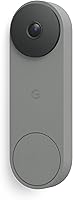
How to Add Chime to Arlo Doorbell
To add a chime to an Arlo doorbell, open the Arlo app, go to Add Device, choose Chime, and follow the pairing steps. The chime plugs into a standard outlet and connects over Wi-Fi with no base station needed.
On this page (9 sections)
- What do you need before you start?
- How do you pair the Arlo Chime 2 in the app?
- Where should you place the chime for the best signal?
- Can you use an Alexa speaker as a doorbell chime?
- What should you check if the chime doesn't ring?
- How do you change the chime sound and volume?
- How does the Arlo chime compare with a bundled doorbell kit?
- Which chime options suit different homes?
- What else should you know about Arlo chime setup?
To add a chime to an Arlo doorbell, open the Arlo app, tap Add Device, pick Chime, and pair the unit over Wi-Fi. The Arlo Chime 2 plugs into a standard outlet and needs no base station.
The whole job takes a few minutes once the doorbell is already set up. You'll need the app, a free outlet near the door, and your Wi-Fi password.
What do you need before you start?
You need the Arlo app, a powered outlet, and your home Wi-Fi password. The chime also has to sit within reach of your router's signal.
Have the doorbell already added to the same Arlo account. The chime pairs to the account, not directly to the camera, so both devices show up in one place.
Keep the chime box nearby for its QR code or setup code if the app asks for one. A phone with Bluetooth on makes discovery faster.
If your doorbell runs on battery, there's no wiring to touch. The chime is a separate accessory and does not draw power from the doorbell.
The Arlo Video Doorbell 2K itself can run wire-free on its rechargeable battery or hardwired to existing doorbell wiring for trickle charging. Either way, the chime setup is the same, because the Chime 2 is its own device on your Wi-Fi network.
How do you pair the Arlo Chime 2 in the app?
Plug the chime in, open the Arlo app, tap the plus icon, choose Chime, and follow the prompts. The app walks you through Wi-Fi selection and naming.
- Plug the chime into an outlet near the door.
- Open the Arlo app and sign in to the account that holds the doorbell.
- Tap Add Device, then select Chime from the list.
- Pick your Wi-Fi network and enter the password.
- Scan the code on the chime or confirm the device when it appears.
- Name the chime by room, then save.
The Arlo Chime 2 uses wire-free Wi-Fi setup and needs no base station. Once paired, it rings when the doorbell button is pressed and can also sound for motion alerts.
The chime connects over Wi-Fi only, so it stays tied to your home network. It won't pair to the doorbell over Bluetooth after setup, which is why the Wi-Fi password step matters more than the scan step.
Where should you place the chime for the best signal?
Place the chime between the door and the rooms you use most. A hallway outlet or kitchen wall usually beats a spot deep in the house.
The chime talks to your Wi-Fi network, so it needs a steady signal more than a short distance to the door. Metal doors, thick concrete and foil-backed insulation all cut that signal.
Try one outlet first. If pairing fails or rings arrive late, move the chime closer to the router or to the door.
The Arlo Chime 2 is rated at 80+ decibels, so it carries well through open doors. In a large or closed-off home, a second chime in another room helps more than turning up the volume.
The doorbell uses a single-band 2.4 GHz Wi-Fi connection. Keeping the chime on an outlet that also gets solid 2.4 GHz coverage gives the pair the most consistent link, so avoid a spot that only your 5 GHz devices reach.
Can you use an Alexa speaker as a doorbell chime?
Yes. An Alexa speaker can announce the doorbell when someone presses it, so you get a spoken alert in the room where the speaker sits.
Arlo works with Alexa, Apple Home, Google Home and SmartThings. In the Alexa app, enable the Arlo skill and link your account, then set the doorbell to announce presses.
This suits homes that already have an Echo in the kitchen or living room. It adds a voice alert without buying another chime.
Voice announcements are not as loud as a dedicated ringer, and they depend on your Wi-Fi and the speaker being online. For a guaranteed loud ring, the Arlo Chime 2 is the more direct option.
The doorbell also works with Samsung SmartThings and IFTTT. Those integrations let you trigger routines on a press, such as turning on porch lights.
That's useful alongside an Alexa announcement, but neither replaces a plain audible ringer in every room.
What should you check if the chime doesn't ring?
Confirm the chime is online in the app and that the doorbell's ring setting includes it. Most failures are a dropped Wi-Fi link or a chime left out of the doorbell's alert list.
Check the app's device list for an offline badge next to the chime. Unplug it, wait a few seconds, and plug it back in to reconnect.
Open the doorbell's settings and make sure the chime is selected for button presses. Some users also set it to ring for motion, which is a separate toggle.
If the chime sits far from the router, move it closer. Slow or 5GHz-only networks can be the cause, and our guide to doorbell camera 5ghz wifi explains how to sort that out.
Also confirm the doorbell still shows as connected. If the camera has dropped off Wi-Fi, presses won't reach the chime even though the chime itself looks fine.
Recheck the camera's connection in the app before you reset anything.
How do you change the chime sound and volume?
Open the chime's settings in the Arlo app to pick a melody and set the volume. You can also turn the siren or door alarm on or off there.
The Arlo Chime 2 lets you choose from several ringtones and adjust how loud each one plays. Set a softer tone for daytime and a louder one if you nap or work from home.
You can also set the chime to sound for motion as well as presses. That's handy for deliveries, though it adds alerts during busy foot traffic.
Use activity zones in the doorbell settings to cut false motion before it reaches the chime. A zone over the porch steps keeps the ringer tied to real visitors.
The Chime 2 also includes an 80+ decibel siren and a door alarm. Treat those as a separate switch from the normal ringtone, so a loud deterrent tone doesn't play for every visitor.
Do custom chime sounds carry over to the siren?
The ringtone and the siren are separate settings in the app. Picking a melody for visitors doesn't change the alarm sound, and the siren is meant for deterrence rather than everyday doorbell presses.
Set each one on its own so a routine delivery doesn't trigger the loudest tone in the house.
How does the Arlo chime compare with a bundled doorbell kit?
Buying the doorbell and chime together is the simplest route for a new setup. Arlo sells the Video Doorbell 2K as a bundle that includes the Arlo Chime 2.
The doorbell records in 2K with a 180-degree view and works over 2.4 GHz Wi-Fi. It runs on a rechargeable battery or wired trickle charging.
Arlo says the chime hits 80+ decibels and offers a siren for deterrence.
Cloud video history and smart detection need a paid plan after the trial. Live view and basic alerts work without one, and our post on the nest doorbell subscription covers how those plans compare across brands.
If you already own the doorbell, the standalone Arlo Chime 2 is the add-on. If you're starting fresh, the bundle saves a separate purchase.
The kit also includes the chime's Wi-Fi setup, so you skip hunting for the accessory later.
Which chime options suit different homes?
The Arlo Chime 2 fits most Arlo owners, while a whole-home setup may want more than one. Other brands build chimes in, which matters if you haven't bought a doorbell yet.
The Blink Chime rings for presses and motion from Blink doorbells. It sets up in the Blink app with a standard outlet, and the slim design blends into a wall.
It won't pair with an Arlo doorbell, so it's only a fit if you already own Blink gear. See our roundup of the wireless video doorbell with chime for more whole-kit options.
The Aqara G410 includes a 95dB chime and its own hub. It supports 2.4 GHz and 5 GHz Wi-Fi and stores clips on a microSD card up to 512GB or in the cloud.
It's a good pick if you'd rather not add a separate chime later. Battery life varies by brand, and our guide to blink doorbell battery shows what to expect from a battery-powered ringer.
What's the catch with a built-in chime?
A built-in chime saves a purchase but ties the ringer to that brand's system. The Aqara G410 uses its included chime as the indoor ringer and works with its own app and hub.
That's convenient in a fresh setup, but it doesn't help if you already own an Arlo doorbell. For an existing Arlo camera, a separate Arlo Chime 2 is the only way to get the same in-app ring control.
What else should you know about Arlo chime setup?
Adding a chime to an Arlo doorbell is a one-time app job, and the ring settings live in the same place afterward. Pair it, name it, then tune the sound to your home.
If the app can't find the chime, check that it's plugged in and that Bluetooth is on. Restart the app before resetting the device, and keep the chime near the router during setup.
Don't expect the chime to replace your phone alerts. It adds sound for when the phone isn't in reach, and both work together.
When you're ready to buy, match the chime to your doorbell brand. The Arlo Chime 2 pairs only with Arlo, and the same goes for other brands' ringers.
Frequently asked questions
Does the Arlo Chime 2 need the Arlo base station?
No. The Arlo Chime 2 connects to Wi-Fi on its own, so you don't need a base station to pair it.
Plug it into an outlet near the door, then add it in the Arlo app as a separate device.
Can you use an Arlo doorbell without a chime?
Yes. The doorbell sends alerts to your phone and supports two-way audio without any indoor ringer.
A chime only adds an audible sound inside the house for when your phone isn't nearby.
How far can an Arlo Chime 2 sit from the doorbell?
Keep the chime inside the Wi-Fi range of your router and reasonably close to the doorbell. Thick walls and metal doors weaken the signal, so move the chime to another outlet if pairing drops or alerts lag.
Does the Arlo Chime 2 need a subscription?
No. Ringing and motion alerts work without a paid plan.
Arlo Secure adds 60-day video history and smart detection, but the chime itself only needs the app and an outlet.
Can I connect more than one chime to an Arlo doorbell?
Yes. You can add several Arlo Chime 2 units in the same app account and place them around the house.
Each one pairs as its own device, so a large home can cover more than one room.