7 Best Wireless Video Doorbells With a Chime (November 2026)
The best wireless video doorbells with indoor chimes include the Wyze Wireless Duo Cam Doorbell for package watchers, the Arlo Video Doorbell 2K with Chime for siren alerts, and the eufy E340 Kit with Chime for onboard recording.
On this page (8 sections)
- How we chose wireless video doorbells with a chime
- The best wireless video doorbells with chimes
- How do you choose a wireless video doorbell with a chime?
- What should you check before setting up the chime?
- How can you make camera alerts more useful?
- Is local storage or cloud video better?
- What common setup mistakes should you avoid?
- Which wireless video doorbell with a chime should you choose?
The Wyze Wireless Duo Cam Doorbell is our top wireless video doorbell with a chime because it pairs two camera views with an included Wi-Fi chime and removable battery. Arlo suits buyers who want a chime with a siren, while eufy fits homes that prefer built-in local storage.
A wireless chime gives you an audible alert inside the home, while the camera sends video and notifications to your phone. The seven picks below vary in how they handle storage, power, camera coverage and smart home connections, so the right choice depends on how you want to use the door.
For a wider look at camera options, see our guide to the best doorbell cameras for any front door. If you want to compare wireless models beyond chime bundles, read our wireless doorbell camera picks.
Our picks at a glance
-
1

-
2

-
3

- 4
 Check it
Tapo 2K Wireless Video Doorbell with Chime (D210)
Best for alert control - 5
 Best for Apple smart homesCheck it
- 6
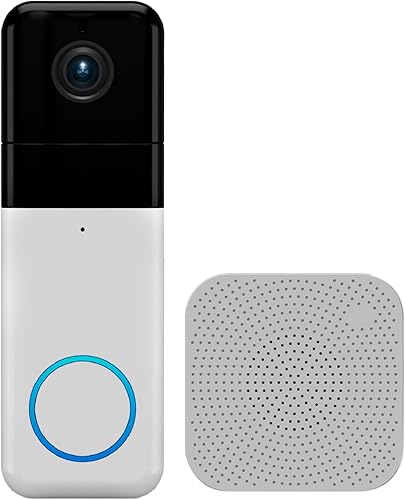 Check it
Wyze Wireless Video Doorbell Pro
Best for tune choices - 7
 Check it
Swann Buddy 4K Wireless Video Doorbell
Best for included memory
How we chose wireless video doorbells with a chime
We compared the included chime, camera coverage, power options, storage and smart home features for shoppers who want a wireless video doorbell with a chime. The scores reflect how well each set of features fits that need.
A chime bundle can mean a separate speaker, a chime that pairs with supported smart home devices, or a camera that works with an existing mechanical chime. That distinction affects setup, where you hear alerts and whether you can keep using a chime already installed in your home.
We also looked at what happens after the chime sounds. Two-way audio lets you speak with visitors from your phone, while activity zones, person detection and quick replies can shape how you handle alerts.
For a screen-based way to check visitors indoors, compare our doorbell cameras with a monitor guide.
| Product | Best for | Video | Power | Chime | Our score |
|---|---|---|---|---|---|
| Wyze Wireless Duo Cam Doorbell | package watchers | 2K | Removable rechargeable battery; hardwired power option | Wi-Fi chime included | 7.8 |
| Arlo Video Doorbell 2K with Chime | siren alerts | 2K | Arlo Chime 2 included | 7.7 | |
| eufy E340 Kit with Chime | onboard recording | 2K | Battery; wired power can top up the battery | 7.6 | |
| Tapo 2K Wireless Video Doorbell with Chime (D210) | alert control | 2K | Included; indoor use | 7.2 | |
| Aqara Doorbell Camera G410 | Apple smart homes | 2K; HomeKit limits resolution to 1600 × 1200 | Included 95 dB chime | 7.1 | |
| Wyze Wireless Video Doorbell Pro | tune choices | 1440p | Included; 20 tunes and 8 volume levels | 7.1 | |
| Swann Buddy 4K Wireless Video Doorbell | included memory | 4K | 7.0 |
The best wireless video doorbells with chimes
These seven picks serve different priorities, from separate package views and built-in storage to smart home support and chime sound options. Start with the feature that would make the biggest difference in your home, then check power, storage and chime compatibility.
Wyze Wireless Duo Cam Doorbell: Best for package watchers
- Two cameras for people and doorstep views
- 2K video and color night vision
- Removable rechargeable battery
- Wi-Fi chime included
Two cameras give you separate views of visitors and the doorstep, while the included Wi-Fi chime alerts you inside. Local microSD recording is available with a card sold separately.
Pros
- Separate people and package views
- Removable battery pack
- MicroSD local storage option
Cons
- MicroSD card sold separately
- 24/7 local recording requires hardwired power
Wyze’s Duo Cam Doorbell is the strongest fit here for checking both visitors and the doorstep. One camera focuses on people and the other on the ground, which gives you separate views when you want to see who arrived and whether a package was left nearby.
It records in 2K and offers color night vision. The removable rechargeable battery can be taken out for charging, and hardwired power can support 24/7 local recording when you add a microSD card.
The included Wi-Fi chime sounds inside the home, and two-way audio lets you respond through the Wyze app. The doorbell also supports Alexa, Google Assistant and IFTTT.
Choose it if package coverage matters as much as visitor video. Skip it if you need local storage ready to use without buying a card, or if you want continuous recording without connecting hardwired power.
Arlo Video Doorbell 2K with Chime: Best for siren alerts
- 2K video with 180-degree view
- Arlo Chime 2 included
- Rechargeable battery or wired trickle charging
- Siren and selectable melodies
The included Arlo Chime 2 offers selectable melodies and volume, plus a siren or door alarm. The doorbell supports battery power or wired trickle charging.
Pros
- Chime has a siren and adjustable volume
- 2K video and head-to-toe view
- Basic alerts and live streaming work without a subscription
Cons
- Advanced features require a paid Arlo Secure plan after the trial
- Single-band Wi-Fi
Arlo’s bundle pairs its 2K video doorbell with the Arlo Chime 2, which offers selectable melodies, adjustable volume and an 80-plus-decibel siren or door alarm. That makes it the clear fit for a household that wants the indoor unit to do more than play a doorbell tone.
The doorbell has a 180-degree view and supports a rechargeable battery or wired trickle charging. It also provides motion alerts, night vision, two-way audio and quick replies, with live streaming and basic alerts available without a subscription.
Advanced features such as AI detection and 60-day video history require a paid Arlo Secure plan after the trial. The doorbell uses single-band Wi-Fi, so check that your network setup suits it.
Pick Arlo if the siren and adjustable sound are high priorities. Skip it if you want advanced detection and video history without a paid plan; compare local-storage options from Wyze, eufy and Tapo instead.
eufy E340 Kit with Chime: Best for onboard recording
- Two cameras for people and ground views
- 2K video and color night vision
- Built-in 8GB local storage
- Wireless or wired power
Two camera views cover visitors and the floor in front of the door. The kit includes a chime, and the doorbell has built-in 8GB storage.
Pros
- Built-in local storage
- Dual camera views
- Can connect with compatible existing chimes and smart home devices
Cons
- Wired mode requires the battery to remain installed
- Compatibility varies by chime type
The eufy E340 Kit is a strong fit if you want two camera views and storage built into the doorbell. Its front camera focuses on people, while the downward camera covers the floor area in front of the door.
The camera records in 2K and has 8GB of built-in local storage. The kit includes a chime, and the doorbell can also connect to compatible existing mechanical chimes, eufy HomeBase devices, certain eufy chimes, Alexa devices and Google Assistant devices.
The E340 can run on battery power or use wired power to top up its installed battery. Wired mode requires a connected power source, and the battery stays in place.
Choose it if built-in storage and separate ground coverage are useful to you. Skip it if you need to keep a specific older eufy chime, since the E340 does not work with some older models and chime compatibility varies.
Tapo 2K Wireless Video Doorbell with Chime (D210): Best for alert control
- 2K resolution and 160-degree view
- Included indoor chime
- Free person detection and activity zones
- microSD local storage option
The D210 combines a 160-degree view with motion zones and free person detection. It includes an indoor chime and can save footage to a microSD card sold separately.
Pros
- Activity zones and person detection
- Local storage option
- Included 15-degree horizontal wedge
Cons
- Chime is for indoor use only
- microSD card sold separately
The Tapo D210 suits buyers who want more control over what triggers alerts. Activity zones and free person detection can focus notifications on selected areas and people, instead of every movement the camera can see.
It records in 2K and has a 160-degree diagonal field of view. The included chime is for indoor use, and footage can be saved to a microSD card sold separately or to Tapo Care cloud storage.
The rechargeable battery allows placement without doorbell wiring. Alexa and Google Assistant are supported, and the included 15-degree horizontal wedge can help adjust the mounting angle when the doorbell sits perpendicular to the entrance.
Choose the D210 if you want adjustable alert areas and person detection. Skip it if you need built-in storage or a chime you can place outdoors.
Aqara Doorbell Camera G410: Best for Apple smart homes
- 2K video and 175-degree view
- Included 95 dB chime
- HomeKit Secure Video support
- Built-in Zigbee and Matter hub
The G410 includes a 95 dB chime and supports HomeKit Secure Video, along with several other smart home platforms. Its chime is required because it does not connect to a traditional existing chime.
Pros
- HomeKit Secure Video support
- Built-in Zigbee and Matter hub
- microSD slot is inside the chime
Cons
- Does not connect to a traditional chime
- HomeKit limits video resolution
The Aqara G410 is a good fit for smart homes built around Apple HomeKit Secure Video. It also supports Matter, Alexa, Google Assistant, SmartThings and Home Assistant, and includes a built-in Zigbee and Matter hub.
Its 2K camera has a 175-degree view, and the included chime reaches 95 dB. The chime holds the microSD card slot, so local storage stays inside the home rather than at the outdoor doorbell.
The G410 is designed to use its included chime and does not connect to a traditional existing chime. When connected to Apple HomeKit, video resolution is limited to 1600 × 1200; that limit also applies in Aqara Home when both platforms are used at once.
Choose it if its platform support and included chime suit your setup. Skip it if keeping a traditional mechanical chime is essential.
Wyze Wireless Video Doorbell Pro: Best for tune choices
- 1440p video and head-to-toe view
- Included wireless chime with 20 tunes
- Battery power with optional wiring
- Two-way audio
The included chime has 20 tunes and 8 volume levels, including a dog bark tone. The doorbell offers battery power and optional wiring to existing doorbell lines.
Pros
- Many chime tunes and volume settings
- Head-to-toe view
- Optional local storage with a microSD card
Cons
- 1440p rather than 2K video
- Local storage requires a separate microSD card
Wyze’s Wireless Video Doorbell Pro suits buyers who want variety in the sound heard indoors. Its included chime offers 20 tunes and 8 volume levels, including a dog bark tone.
The doorbell records at 1440p and uses a 1:1 view to show visitors and the area near the ground. It supports two-way audio, battery power and optional wiring to existing doorbell lines.
Local footage can be saved with a microSD card, while Cam Plus is an optional route to cloud storage and human detection. The card is sold separately, so account for that if local recording is important.
Choose this model for its chime choices and head-to-toe view. Skip it if you specifically want 2K video or separate camera views for people and packages.
Swann Buddy 4K Wireless Video Doorbell: Best for included memory
- 4K video and 165-degree view
- Chime speaker unit included
- 32GB microSD card included
- Battery or existing wiring
Swann pairs a 4K doorbell camera with a chime speaker unit and includes a 32GB microSD card. It can run on its rechargeable battery or connect to existing wiring.
Pros
- 4K video
- 32GB microSD card included
- Battery or wired power
Cons
- Lower score than the other picks for this roundup
- Chime details such as volume and melody count are not specified
The Swann Buddy 4K is the pick for buyers who want a microSD card included. Its 32GB card provides a local storage option without requiring a separate card purchase.
The doorbell records in 4K, has a 165-degree view and supports two-way audio. It can run on its rechargeable battery or connect to existing wiring, and the bundle includes a chime speaker unit.
Swann describes both local and cloud storage, but the chime’s melody and volume choices are not specified. If sound customization or a siren is central to your decision, Arlo and Wyze provide clearer details about their chime features.
Choose Swann if included local storage and 4K video outweigh the need for detailed chime controls. Skip it if a wide set of chime options is a deciding factor.
How do you choose a wireless video doorbell with a chime?
Choose a wireless video doorbell with a chime by starting with the alert you need, then matching the camera view, storage and power to your home. A strong resolution number matters less if the camera misses the package area or the chime is hard to hear from the rooms you use.
First decide whether you need a separate indoor speaker or can use an existing chime or smart speaker. Arlo, Wyze and Swann include dedicated chime units, while eufy supports certain existing chimes and devices.
Aqara requires its included chime, and Tapo’s included chime is for indoor use.
Next choose a camera view that fits your entryway. Dual-camera models from Wyze and eufy give you a separate view of people and the ground, while the other models use a single camera view.
Consider where packages are usually left and whether a head-to-toe view covers that area from your mounting position.
Finally, choose a power and storage setup you can maintain. Battery models avoid doorbell wiring but need charging or battery changes, while wired options can reduce charging needs or support trickle charging.
Local storage also differs: some models include it, while others need a separately purchased microSD card.
What should you check before setting up the chime?
Check the chime’s connection type, location and compatibility before mounting the camera. This prevents a common mismatch: buying a doorbell that includes a chime but does not work with the sound setup you wanted.
Place an indoor chime where you can hear it in the rooms you use most. If it relies on a wireless connection to the doorbell, keep the units close enough for a reliable signal and avoid placing them behind thick walls or metal barriers.
Before attaching the doorbell, use the app to confirm the camera can connect to your Wi-Fi where it will be mounted. Check the supported Wi-Fi band for the specific model, too.
The Aqara G410 supports 2.4 GHz and 5 GHz, while the Tapo D210 connects through 2.4 GHz Wi-Fi.
For wired installation, confirm that your existing wiring fits the doorbell’s stated requirements before connecting it. The eufy E340 requires its battery to stay installed in wired mode and a compatible 16–24V power source.
If you do not know what your existing wiring supplies, check it before choosing wired operation.
How can you make camera alerts more useful?
Use activity zones and detection settings to focus alerts on the areas that matter. A doorbell pointed at a busy sidewalk may notify you about movement that has nothing to do with your entrance, so aim and configure it for your own doorway.
Tapo offers activity zones and free person detection. Arlo has activity and privacy zones, while Aqara offers adjustable detection settings; each brand’s app controls the available options.
Test the view from the app after mounting, both during daylight and after dark. Adjust the camera angle if the image leaves out the person or package area you care about, and clear anything that blocks the lens or spotlight.
Is local storage or cloud video better?
Local storage is a good fit if you want footage saved without relying on a cloud plan, while cloud storage may suit buyers who want remote video history or detection features tied to a service. Check what each model stores locally and which features require a subscription.
Eufy has 8GB of built-in local storage, and Swann includes a 32GB microSD card. Wyze Duo Cam and Tapo support microSD cards sold separately; Aqara’s microSD slot is inside its chime.
Cloud options vary. Arlo’s advanced detection and 60-day video history require a paid plan after the trial.
Live streaming and basic alerts work without a subscription. Tapo offers optional Tapo Care cloud storage, and Wyze offers optional Cam Plus cloud storage.
Before buying a card, check the doorbell’s card support and format guidance. Wyze Duo Cam supports cards up to 512GB in FAT32 or exFAT formats, while Tapo recommends a Class 10, U1, endurance card or higher.
What common setup mistakes should you avoid?
The most common setup mistakes are choosing the wrong chime type, overlooking a required card or plan, and mounting before checking the camera angle. A few checks before installation can prevent extra work later.
Do not assume every included chime works outdoors or with your old mechanical chime. Tapo’s unit is for indoor use, Aqara requires its own chime, and eufy works with selected existing chimes and devices.
Do not treat “wireless” as meaning every part of the system is battery powered or independent of Wi-Fi. These cameras use Wi-Fi for app features, and battery life or charging needs can change with recording and live-view use.
Avoid placing the camera where the door frame blocks its downward view. A slight angle adjustment may help, and Tapo includes a 15-degree horizontal wedge for mounting situations where the entrance sits perpendicular to the camera.
For a guide to camera placement, see how high to mount a video doorbell.
Which wireless video doorbell with a chime should you choose?
Choose the Wyze Wireless Duo Cam Doorbell for separate people and package views, Arlo for an included chime with a siren, or eufy for built-in local storage. Those three choices cover the clearest differences in camera coverage, sound and storage.
Pick Tapo if you want person detection and activity zones, Aqara if its smart home support fits your setup, Wyze Pro if you want many chime tunes, or Swann if you want 4K video with a memory card included. Before you buy, confirm the chime style, Wi-Fi connection and storage plan fit your home.
For a wider comparison of camera layouts, see our dual camera video doorbell picks. If an indoor screen would help you answer visitors, return to our doorbell cameras with a monitor guide.
Our top 3 picks at a glance
-
1
-
2
-
3


