8 Best Doorbell Cameras for Home Assistant (November 2026)
The best doorbell cameras for Home Assistant include the Aqara Doorbell Camera G400 with Chime for Home Assistant integration, the aosu 2K Wireless Doorbell Camera with aosuBase for renters, and the Cookedixo 1080P Video Doorbell Camera Wireless for simple budgets.
On this page (7 sections)
- The best doorbell cameras for Home Assistant setups
- How these doorbell cameras were compared
- What should you check before buying a doorbell camera for Home Assistant?
- Should you pick a wired or battery doorbell for a smart home?
- How much local storage does a Home Assistant doorbell need?
- Which doorbell camera fits your Wi-Fi and power at the door?
- Verdict: which doorbell camera should you buy?
The best doorbell camera for Home Assistant is the Aqara Doorbell Camera G400, because RTSP and ONVIF support let you pull its 2K feed straight into a Home Assistant dashboard without a cloud subscription. If you want two camera views and local storage in one unit, the eufy Video Doorbell E340 is the pick, and renters should look at the battery-powered aosu 2K.
Home Assistant owners care about more than picture quality. You want a camera that streams on your local network, records without a monthly fee and survives rain at the front door.
This guide ranks eight doorbells by how well they fit that kind of setup.
Our doorbell camera buying guide covers the basics if you are still deciding whether you want a camera at all. If a screen by the door matters more than app control, see the doorbell camera with monitor roundup.
Our picks at a glance
-
1
 Best for Home Assistant integration
Aqara Doorbell Camera G400 with Chime
9.7/10 our score
See it on Amazon -
2
-
3
 Best for simple budgets
Cookedixo 1080P Video Doorbell Camera Wireless
9.0/10 our score
See it on Amazon
- 4
 Best dual camera with local storageCheck it
- 5
 Best for RTSP users on a budgetCheck it
- 6
 Check it
Wyze Wireless Duo Cam Doorbell
Best for Wyze smart homes - 7
 Best for no-subscription basicsCheck it
- 8
 Check it
Anona 3K Dual Cam Video Doorbell
Best for high resolution on a budget
The best doorbell cameras for Home Assistant setups
The Aqara G400 leads because it is the only pick here that names RTSP and ONVIF support, which is what Home Assistant needs to read a camera feed. Every other model solves a more specific need, from a renter-friendly battery install to dual cameras for package watching.
Aqara Doorbell Camera G400 with Chime: Best for Home Assistant integration
- 2K 165° head-to-toe view
- RTSP/ONVIF and HomeKit Secure Video
- Wi-Fi 6 on 2.4 and 5 GHz
- Wired or PoE power
RTSP and ONVIF support make the G400 the easiest pick to pull into a Home Assistant dashboard, and local AI detection keeps alerts inside your network.
Pros
- RTSP/ONVIF support
- Local person and package detection
- Wi-Fi 6 on both bands
- microSD and NAS backup
Cons
- Requires doorbell wiring or PoE
- HomeKit mode caps resolution at 1200p
Aqara builds the G400 for people who already run a smart home hub. The headline feature is RTSP/ONVIF support, so you can add the stream to Home Assistant and view it on a dashboard next to your lights and sensors.
Its 2K sensor gives a 165-degree head-to-toe view in a 3:4 frame, which shows a visitor's face and the parcel at their feet in one picture. Local person detection and zone alerts run on the camera, so notifications do not wait on a cloud round trip.
Custom quick replies and a voice-changing intercom let you answer the door without opening it, and visitor face recognition adds another layer of awareness.
Power comes from existing 8–24V doorbell wiring or a PoE connection, and Wi-Fi 6 on both 2.4 and 5 GHz keeps the link steady. Footage records to a microSD card up to 512GB and backs up to a compatible NAS.
Near-invisible 940nm infrared LEDs keep night vision discreet so neighbors are not disturbed.
The trade-off is installation: you need wiring or PoE at the door. HomeKit Secure Video mode also drops resolution to 1200p.
Read our full wireless doorbell camera comparison if a battery unit suits you better.
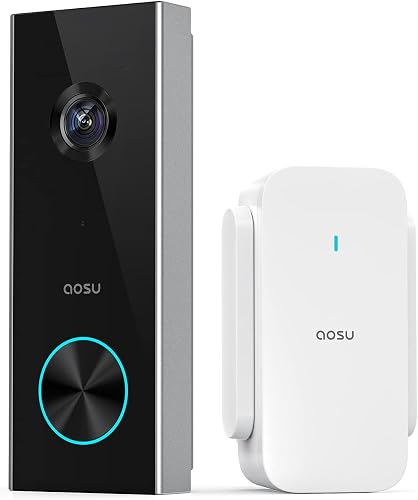
aosu 2K Wireless Doorbell Camera with aosuBase: Best for renters
- 2K 166° wide view
- 5200 mAh battery
- aosuBase Mini adds Wi-Fi, storage and chime
- microSD up to 128GB
The aosuBase Mini boosts Wi-Fi, stores clips locally and rings indoors, so a renter can add a camera without touching the doorbell wiring.
Pros
- No wiring needed
- Local microSD storage
- AI human detection
- Quick replies and voice changer
Cons
- 2.4 GHz Wi-Fi only
- Battery needs recharging
The aosu kit suits renters and anyone who cannot run wires to the door. Its 5200 mAh battery powers the camera, and the included aosuBase Mini does three jobs at once: it extends 2.4 GHz Wi-Fi, holds a microSD card for local clips and rings indoors as a chime.
The 2K sensor uses a 166-degree, 4:3 frame that shows visitors head to toe. AI person detection filters out passing cars, so fewer false alerts reach your phone.
Two-way talk includes quick replies and a voice changer for privacy when you speak to strangers.
A Home Assistant owner can use the base's local storage and treat the camera as a separate Wi-Fi device. It runs on 2.4 GHz only, so a crowded 5 GHz network does not help here.
A card up to 128GB stores recordings without a subscription.
Skip it if you want a continuous stream in Home Assistant. A battery camera sleeps to save power and wakes on events.
Choose the G400 when an always-on feed matters more than a wire-free install.
Cookedixo 1080P Video Doorbell Camera Wireless: Best for simple budgets
- 1080P with infrared night vision
- AI human detection
- 2.4 GHz Wi-Fi only
- Indoor receiver included
A low-cost wireless option with an indoor receiver in the box, though live view and playback need a cloud plan and there is no local card slot.
Pros
- Indoor receiver included
- AI human detection
- Infrared night vision
- Battery powered
Cons
- Cloud plan needed for live view
- No microSD storage
- 2.4 GHz Wi-Fi only
Cookedixo is the budget entry in this group. It offers a 1080P picture with infrared night vision and AI human detection, and it ships with an indoor receiver you can plug into any room.
Pair more receivers if your house is long.
The trade-off is storage. There is no microSD slot, so live view and playback depend on a cloud plan.
If your Home Assistant setup relies on local recordings, this is not the camera for you.
Cloud clips are encrypted with AES-128, so footage stays private in transit, but a subscription is still the gate.
Its 2.4 GHz-only radio keeps setup simple. Battery power means no wiring, and the pre-capture feature starts recording the moment motion triggers.
Motion-only alerts mean you will not get a separate package notification.
Choose it when you want a cheap second camera at a side door and do not mind a subscription. Pass on it if local storage or a direct RTSP feed is part of your plan.
eufy Video Doorbell E340: Best dual camera with local storage
- Dual cameras for visitors and packages
- 2K FHD
- 8GB built-in storage
- Battery or wired
The downward camera shows packages at the door, and the built-in 8GB storage means no subscription for clips you keep locally.
Pros
- Dual camera views
- No subscription needed
- Battery or wired power
- Color night vision
Cons
- 2.4 GHz Wi-Fi only
- No HomeKit support
eufy's E340 brings two cameras to the door. The front lens sees visitors at eye level while the lower lens watches the step for packages.
Both feed a 2K picture, and color night vision keeps the view usable after dark, with a clear nighttime distance of up to 16ft.
The part that matters for a smart home is the 8GB of built-in storage. Clips stay on the camera with no subscription, so you keep recordings without a monthly bill.
It runs on a swappable battery or wired 16–24V power, so you can mount it wire-free and top it up later.
The E340 supports Alexa and Google Assistant but not HomeKit. It also stays on 2.4 GHz Wi-Fi.
Pair it with an eufy HomeBase or Minibase Chime to hear alerts around the house.
Pick it if package watching and free local storage matter more than Home Assistant video. Our dual camera video doorbell roundup compares it with other two-lens models.
Reolink Video Doorbell WiFi: Best for RTSP users on a budget
- 2K 4:3 wide view
- 2.4 and 5 GHz Wi-Fi
- Chime V2 included
- Hardwired power
A hardwired 2K doorbell with dual-band Wi-Fi and an included chime, built to pair with Reolink's app and NVR system.
Pros
- 2.4 and 5 GHz Wi-Fi
- Wide 180-degree view
- Chime included
- Local storage without a subscription
Cons
- Needs hardwired power
- Best features tie to Reolink accessories
Reolink's wired doorbell gives you a 2K picture in a 4:3 frame with a 180-degree field of view. A 15-degree wedge is in the box for aiming it down a path or across a porch.
The included Chime V2 plays 10 tunes at adjustable volume.
Hardwired 12–24V power means the camera can record around the clock and pre-record before motion events. Dual-band 2.4 and 5 GHz Wi-Fi helps when the signal at the door is weak.
The app supports up to 20 user accounts, with 12 streaming at once for family sharing.
Reolink's app handles alerts and smart detection for people, vehicles and animals. It also supports privacy masks and encrypted storage.
The catch is that the best experience comes with Reolink's own NVR and accessories.
Choose it for a hardwired install with local recording. Pass if you need a direct RTSP feed into Home Assistant without Reolink's app in the middle.
Wyze Wireless Duo Cam Doorbell: Best for Wyze smart homes
- Two camera views
- 2K with color night vision
- Removable 6200 mAh battery
- Wi-Fi chime included
A dual-camera battery doorbell with a removable pack and free local storage, plus Alexa, Google Assistant and IFTTT support.
Pros
- Removable battery pack
- Local microSD storage
- Dual-band Wi-Fi
- Wi-Fi chime included
Cons
- microSD sold separately
- Cloud storage needs Cam Plus
The Wyze Duo Cam pairs two lenses with a removable 6200 mAh battery. One camera watches people and the other watches the doorstep.
Both deliver 2K with color night vision from a starlight sensor.
Local storage is free: a microSD card up to 512GB holds your clips, though the card is sold separately. A Wi-Fi chime is included for indoor alerts, and the doorbell talks to Alexa, Google Assistant and IFTTT.
Setup is quick. The adhesive mount means no screws, and dual-band Wi-Fi handles both 2.4 and 5 GHz networks.
IP65 weatherproofing covers rain and dust. Wyze rates the pack at up to 6 months per charge.
It fits homes already using Wyze cameras. The trade-off is that a Home Assistant feed still needs work, since the doorbell centers on the Wyze app and its own rules engine.
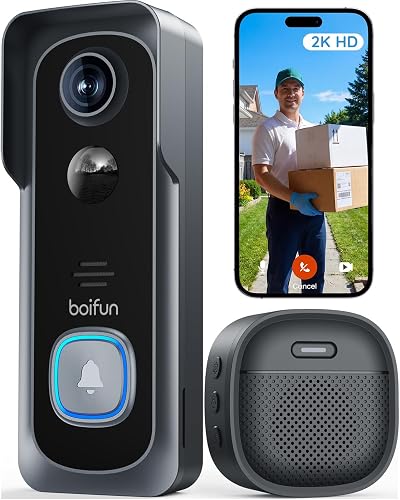
BOIFUN 2K Video Doorbell: Best for no-subscription basics
- 2K 166° view
- No subscription required for core features
- 2.4 GHz Wi-Fi only
- microSD up to 128GB
Core features like alerts, two-way talk and playback work without a plan, and a microSD card keeps clips local.
Pros
- No subscription for core features
- Local microSD storage
- 166-degree view
- Tamper alarm
Cons
- 2.4 GHz Wi-Fi only
- Battery is not removable
BOIFUN keeps the basics free. Real-time alerts, two-way talk, human detection and video playback all work without a subscription.
A microSD card up to 128GB stores clips locally, so your recordings stay in the house.
The 2K sensor covers a 166-degree view with an f/2.5 aperture. Invisible 940nm infrared gives night vision up to 10 meters without a red glow.
A built-in tamper alarm sounds if someone tries to pull the camera off the wall.
The battery is built in and not removable, so you recharge the whole unit. It runs on 2.4 GHz Wi-Fi only.
BOIFUN rates the battery at up to 60 days with 30 daily activations. A 1.2T AI chip processes alerts quickly.
Pick it when you want a no-subscription doorbell and can live without a direct Home Assistant stream. Our doorbell camera guide explains when local storage alone is enough.
Anona 3K Dual Cam Video Doorbell: Best for high resolution on a budget
- 3K 5MP main camera plus a second camera
- AI detection for people, pets and packages
- 5200 mAh battery
- Wi-Fi 6 on 2.4 GHz
A dual-camera doorbell with a 3K main lens and free AI detection, though its smart home integrations are limited to Alexa and Google.
Pros
- 3K main camera
- Free package and pet detection
- Large microSD support
- Voice changer
Cons
- No HomeKit or RTSP support
- 2.4 GHz Wi-Fi only
Anona offers the highest resolution here with a 3K 5MP main camera and a second lens for packages, pets and doorstep activity. AI detection for people, pets and packages is free, with no subscription required.
Power is flexible. A 5200 mAh battery gives a wire-free install, or you can hardwire it at 8–24V AC for 24/7 recording.
Storage goes to a microSD card up to 512GB or optional cloud.
It adds Wi-Fi 6 on 2.4 GHz, IP65 weather resistance, an indoor chime and a voice changer with two voice effects. The gap for a smart home is integration: it works with Alexa and Google Assistant only.
Choose it if picture sharpness and free package alerts top your list. Pass if Home Assistant integration is the point, since there is no RTSP or HomeKit support here.
How these doorbell cameras were compared
We ranked these doorbells by how useful each one is to a Home Assistant owner, then by picture quality, power options and storage.
Home Assistant fit came first. A doorbell that exposes RTSP or ONVIF moves to the top, because that is how Home Assistant reads a camera feed.
The Aqara G400 is the only pick here that names those protocols.
Local storage came next. We checked whether each camera records without a subscription.
The Aqara G400, aosu, eufy E340, Wyze Duo Cam, BOIFUN and Anona all offer local storage.
The Cookedixo relies on the cloud.
Power and Wi-Fi followed. Wired or PoE models suit always-on recording.
Battery units suit renters.
Dual-band Wi-Fi 6 helps at a door where the signal is weak. We also weighed field of view and aspect ratio, since a 3:4 or 4:3 frame shows more of the doorstep than a wide 16:9 picture.
Our score weighs specs, features and buyer feedback against what you're shopping for.
| Product | Best for | Power | Field of view | Weather rating | Our score |
|---|---|---|---|---|---|
| Aqara Doorbell Camera G400 with Chime | Home Assistant integration | Wired 8–24V AC/DC or PoE | 165 degrees | IP65 | 9.7 |
| aosu 2K Wireless Doorbell Camera with aosuBase | renters | Battery, 5200 mAh | 166 degrees | 9.4 | |
| Cookedixo 1080P Video Doorbell Camera Wireless | simple budgets | Battery | 9.0 | ||
| eufy Video Doorbell E340 | dual camera with local storage | Battery or 16–24V wired | 8.6 | ||
| Reolink Video Doorbell WiFi | RTSP users on a budget | 12–24V AC hardwired | 180 degrees | 7.8 | |
| Wyze Wireless Duo Cam Doorbell | Wyze smart homes | Removable battery, 6200 mAh | 7.8 | ||
| BOIFUN 2K Video Doorbell | no-subscription basics | Built-in rechargeable battery | 166 degrees | 7.3 | |
| Anona 3K Dual Cam Video Doorbell | high resolution on a budget | Battery or 8–24V AC wired | 6.8 |
What should you check before buying a doorbell camera for Home Assistant?
Check the stream protocol first. RTSP or ONVIF support decides whether Home Assistant can read your doorbell video directly, and most mainstream doorbells skip both.
Without one of them, your feed lives in the brand's app.
The Aqara G400 names RTSP and ONVIF support in its feature list. That means Home Assistant can pull the stream without a bridge or a cloud account.
For other brands here, plan on using the maker's app or an NVR as the middle layer. Check the field of view and aspect ratio too, since a head-to-toe frame matters more than raw width when you want to see packages.
Is RTSP or ONVIF support really necessary?
It is the difference between a dashboard tile and a separate app. With RTSP, Home Assistant treats the doorbell as a generic camera.
With ONVIF, it can often read events too.
If neither protocol appears, the camera may still work through a third-party integration. Those depend on the brand and can break after a firmware update.
A native RTSP feed is more reliable.
Does HomeKit Secure Video work with Home Assistant?
Not directly. HomeKit Secure Video records to iCloud and plays through Apple's Home app.
Home Assistant cannot read that stream without an extra bridge. It also needs an iCloud+ plan and an Apple home hub.
The Aqara G400 supports HomeKit Secure Video, so you can run both setups. Note that Apple's mode caps resolution at 1200p.
Use the RTSP feed for Home Assistant and keep HomeKit for Apple devices.
Should you pick a wired or battery doorbell for a smart home?
Pick wired when you want an always-on feed in Home Assistant. A battery camera sleeps between events to save power, so its stream may not stay live on a dashboard.
Wired and PoE models record continuously.
The Aqara G400, Reolink and the wired mode of the eufy E340 and Anona all run from doorbell wiring. The aosu, Cookedixo, Wyze and BOIFUN run on batteries.
Check that your existing transformer sits in the model's voltage range before you buy.
What do you give up with a battery doorbell?
You trade a constant stream for a quick install. Battery doorbells like the aosu and Wyze wake on motion or a button press, which suits event alerts but not a live wall display.
Their detection stays event-based, so a continuous recorder is out.
Battery life varies with traffic. The Wyze pack is removable, so you can swap in a charged one.
The BOIFUN and Anona batteries are built in, so the whole unit comes down to charge. The aosu pack is rated at 5200 mAh.
Can a wired doorbell use PoE instead of doorbell wiring?
Yes, on models built for it. The Aqara G400 accepts PoE or 8–24V AC/DC wiring.
PoE runs power and data over one cable, which is handy when your network switch sits near the door. It also means no separate transformer to size.
Most doorbells here only accept low-voltage doorbell wiring. Check the voltage range on the model you choose, since the wrong supply can damage the unit.
The Reolink needs 12–24V AC or DC 24V, and the eufy E340 and Anona accept 8–24V in wired mode.
How much local storage does a Home Assistant doorbell need?
A microSD card from 128GB to 512GB covers most homes for a week or more of event clips. Built-in storage works too, and the eufy E340 ships with 8GB already inside.
Card sizes differ across these picks. The Aqara G400 and Wyze Duo Cam accept up to 512GB, the Anona up to 512GB, and the aosu and BOIFUN up to 128GB.
The Cookedixo has no card slot.
What if you want recordings on a NAS?
The Aqara G400 backs local footage up to an SMB-compatible NAS server. That keeps video off the card and on your own drive, which is useful if you already run a home server for Home Assistant.
It means the card can stay as a rolling buffer while the NAS keeps the long archive.
Other models here store to a card or the cloud. If NAS backup is part of your plan, the G400 is the straightforward pick.
The Wyze Duo Cam and eufy E340 keep clips on the device only.
Is cloud storage ever the better choice?
Yes, for a renter who wants zero hardware at the door or a backup when the camera is stolen. Cloud plans also add features like richer event detection on some brands.
Footage survives if the unit is taken.
The Cookedixo requires a cloud plan for live view and playback. On the others, cloud is optional and local storage is free.
Weigh the monthly cost against how much you value your own footage staying at home. Local cards can fail or be pulled, so a cloud copy is insurance.
Which doorbell camera fits your Wi-Fi and power at the door?
Check both before you order. Wi-Fi 6 on 2.4 and 5 GHz gives the steadiest link, and doorbell wiring decides whether you can run an always-on camera.
The Aqara G400 covers both with its dual-band radio and wired or PoE power.
Several picks here are 2.4 GHz only: the aosu, eufy E340, Cookedixo, BOIFUN and Anona. That band reaches further through walls but carries more interference in busy neighborhoods.
Dual-band models like the Aqara G400, Reolink and Wyze can move to 5 GHz when the signal is strong. A camera that drops to 2.4 GHz under load may stutter on a live dashboard.
What voltage do these doorbells need?
The Aqara G400 takes 8–24V AC/DC or PoE. The Reolink needs 12–24V AC or DC 24V.
The eufy E340 and Anona accept 8–24V or 16–24V for wired mode. Match the model to your transformer before you buy.
A transformer rated below the camera's minimum will not keep it powered.
A battery model skips this step entirely. The aosu, Cookedixo, Wyze and BOIFUN all run without doorbell wiring.
If you rent or your chime has no low-voltage wiring, a battery pick is the simpler route. The Wyze and aosu also bring their own chime, so you do not need an existing bell at all.
Verdict: which doorbell camera should you buy?
Buy the Aqara Doorbell Camera G400 if Home Assistant integration is your goal. RTSP and ONVIF support, local AI detection and Wi-Fi 6 make it the best doorbell camera for Home Assistant in this group, and the included chime covers indoor alerts.
Its 165-degree head-to-toe view and NAS backup round out the case for an always-on setup.
Choose the eufy E340 for dual cameras and built-in local storage without a subscription. Renters should take the aosu kit for its battery and base station.
Pick the Reolink if you want a hardwired 2K camera with an included chime. The Cookedixo, Wyze, BOIFUN and Anona each fill a narrower budget or feature need.
If a screen by the door is part of your plan, see the doorbell camera with monitor picks before you decide.
Our top 3 picks at a glance
-
1
Best for Home Assistant integration
Aqara Doorbell Camera G400 with Chime
9.7/10 our score
See it on Amazon -
2
-
3
Best for simple budgets
Cookedixo 1080P Video Doorbell Camera Wireless
9.0/10 our score
See it on Amazon
Frequently asked questions
Does a video doorbell work with Home Assistant without cloud services?
Some do. A doorbell that exposes RTSP or ONVIF can stream straight to Home Assistant on your local network.
The Aqara G400 supports both, so you can pull its feed into a dashboard without routing video through a cloud service.
Can I add a doorbell camera to Home Assistant with Zigbee or Z-Wave?
Not directly. Most video doorbells stream over Wi-Fi and expose video through RTSP or ONVIF, while Zigbee and Z-Wave handle sensors and buttons.
A Wi-Fi doorbell that offers RTSP is the practical route for Home Assistant video.
What Wi-Fi band should a Home Assistant doorbell camera use?
Use 5 GHz when the signal reaches the door and 2.4 GHz when it does not. The Aqara G400 and Wyze Duo Cam both support 2.4 and 5 GHz, while the eufy E340 and several budget picks are 2.4 GHz only.
Do I need a subscription for local doorbell recordings?
No, as long as the doorbell has a card slot or built-in storage. The Aqara G400 takes a microSD card and backs up to a NAS, the eufy E340 has 8GB built in and the Wyze Duo Cam takes a card up to 512GB.
Can Home Assistant show my doorbell feed on a wall tablet?
Yes, if the camera exposes a stream Home Assistant can read. RTSP or ONVIF doorbells like the Aqara G400 work best for this.
Add the stream as a generic camera and display it on any dashboard tablet.
Is a wired or battery doorbell better for Home Assistant?
Wired is better for always-on streams. A battery doorbell sleeps between events to save power, so its feed may not stay live in Home Assistant.
The Aqara G400 runs on doorbell wiring or PoE and records around the clock.


