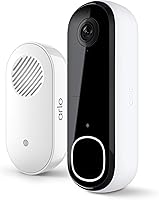
Do Doorbell Cameras Record All the Time?
Wired doorbell cameras can record all the time, because they draw nonstop power from your home's wiring. Battery doorbell cameras do not; they wake for motion events and sleep in between to save power.
On this page (9 sections)
- Do doorbell cameras record all the time, or only when something moves?
- Why wired doorbells can run around the clock
- Why battery doorbells sleep between events
- What "continuous recording" actually costs you
- How continuous recording changes what you catch
- Which wired doorbells suit all-the-time recording?
- Do you need a subscription for all-the-time recording?
- What about Wi-Fi and cold weather?
- The decision rule
Wired doorbell cameras can record all the time, because they draw nonstop power from your home's wiring. Battery doorbell cameras do not; they wake for motion events and sleep in between to save power.
The short version: "record all the time" means two different things. One is continuous video that rolls 24/7.
The other is event recording, where the camera saves a clip when it sees motion. Which one you get depends on how the doorbell is powered and what plan you pay for.
The sections below walk through both.
Do doorbell cameras record all the time, or only when something moves?
Most doorbells record events, not continuous video, even when they are wired. A wired camera stays awake and watches all day, but it only saves footage when its motion detection fires.
Continuous recording, where the camera saves every second, is a separate setting that usually needs a paid plan.
That distinction matters when you are shopping. A camera that "runs all the time" is not the same as one that "records all the time."
Wired power keeps the camera ready. Your subscription and settings decide whether the footage is kept.
So when people ask do doorbell cameras record all the time, the honest answer is: some do, most don't by default. Check the recording modes on the model you want before you buy.
Why wired doorbells can run around the clock
Wired doorbells draw steady low-voltage power from your existing doorbell transformer, so they never need to conserve battery. That steady supply lets the camera stay awake, keep its Wi-Fi link open and respond to motion in a fraction of a second.
The Ring Wired Doorbell 2K is built this way. Ring says it connects right into the same electricity that powers your home, which gives it nonstop power.
Because it isn't rationing battery, it can offer Live View and Two-Way Talk at any moment and send real-time alerts when motion is detected. The camera also carries Retinal 2K video with wide-angle coverage and up to 6x Enhanced Zoom, so a detail at the edge of the frame stays usable when you go back to it.
Ring also says a compatible Ring Protect subscription (sold separately) adds the ability to scroll back in time and rewatch what you missed. That is the piece that turns a live camera into a recorder.
Without the plan, you can watch live and get alerts, but the footage isn't saved for later. Ring also notes that Alexa integration can launch video on an Echo Show, so the live feed is reachable without pulling out your phone.
Why battery doorbells sleep between events
A battery doorbell shuts down most of its radios and sensor between events to stretch its charge. It wakes when motion is detected, records a clip, sends the alert and goes back to sleep.
That cycle is why a battery model cannot record all the time on battery power alone.
This is a power trade-off, not a flaw. A camera running 24/7 on a small battery would drain in days.
Sleeping between events is how battery models last weeks or months per charge.
The catch is gaps. If someone approaches between wake-ups, or a package sits still after delivery, the camera may not catch it.
Wired models avoid this because they are always awake. If wiring isn't an option at your door, our guide on whether a doorbell camera can work without wifi covers the alternatives, including local storage.
What "continuous recording" actually costs you
Continuous recording almost always requires a paid subscription, and that is the biggest hidden cost of running a doorbell around the clock. The camera hardware is only half the purchase.
Ring's plan tiers save video for a set number of days and add features like AI-powered alerts that tell you what's happening. Ring describes these as part of a compatible Ring Protect subscription sold separately.
Blink works the same way: its person detection and saved clips need a compatible Blink subscription, also sold separately.
Plan costs stack up over years. A budget doorbell with a cheap plan can cost less over three years than a premium one with a top tier.
Decide how much saved footage you actually need before you commit. Many households are fine with event clips and don't need every second.
How continuous recording changes what you catch
Round-the-clock recording fills the gaps that event-only cameras leave. A delivery driver who drops a package and leaves in ten seconds, a car that pauses at the curb, a visitor who never rings: continuous video catches all of it because there are no blind spots in time.
Event recording is leaner. It saves storage and makes clips easier to scan, but it depends on motion detection firing in time.
Miss the trigger and the moment is gone.
The quality of the trigger matters as much as the speed. Ring's 4K Pro adds 3D Motion Detection that pinpoints motion on your property, which means fewer nuisance alerts from passing cars and more reliable clips when someone actually walks up.
Ring's 2K model relies on standard motion alerts, so a busy street may produce more noise to sort through. Blink's 2K+ takes a narrower approach with person detection, notifying you when someone is detected rather than every flicker of movement.
For most front doors, event recording covers the important stuff: people arriving, packages dropped, cars pulling up. Continuous recording is worth the extra cost when you want a full record of the street or you've had repeated incidents you need to review frame by frame.
Which wired doorbells suit all-the-time recording?
The wired models below stay powered nonstop, so they are the right base for continuous or event recording. Each one needs its own plan for saved footage.
Ring Wired Doorbell 4K Pro
The Ring Wired Doorbell 4K Pro is the sharpest of the three. Ring says it captures Retinal 4K video with up to 10x Enhanced Zoom and 3D Motion Detection that pinpoints motion on your property for more precise alerts.
It also has Low-Light Sight for color video in dim light. Ring says it installs hardwired for nonstop protection.
If you want the clearest footage from a camera that never sleeps, this is the one to shortlist. Ring also offers it in Deep Silver, Polished Night Navy, Polished Sandstone and Polished Mocha finishes, so the hardware can blend with your exterior rather than stand out.
Blink Wired Doorbell 2K+
The Blink Wired Doorbell 2K+ pairs continuous hardwired power with Head-to-Toe 2K video. Blink says it connects to your existing doorbell wiring so security is always powered.
It adds two-way audio with noise cancellation, person detection and an IP65 weather-resistant body. Blink notes that a Blink Chime (sold separately) is required for in-home alerts, and saved alerts need a compatible Blink subscription.
Its night vision sees true color in low light and switches to crisp black and white in near darkness. The box includes the doorbell plus a mounting kit with screws and anchors.
Do you need a subscription for all-the-time recording?
Yes, in almost every case. The camera can watch all day on wired power, but saving that footage to the cloud is what the plan pays for.
Without it, you get live view and motion alerts, and the video disappears when the event ends.
Some brands offer local storage through a hub or memory card. That can keep clips without a monthly fee, but support varies by model.
Check the recording options on the camera you want before you buy.
If you want saved footage, budget for the plan the same way you budget for the doorbell. Our roundup of the best wireless doorbell cameras compares models that balance recording features against plan costs.
What about Wi-Fi and cold weather?
A camera that records all the time leans hard on your Wi-Fi, because it holds the connection open continuously. A weak signal at the door causes dropped clips and laggy live view.
If your router sits far from the front door, read our guide to doorbell camera 5ghz wifi before you pick a model.
Cold weather is the other practical limit. Wired cameras avoid the battery drain problem, but battery models lose charge faster in freezing temperatures.
Our look at doorbell camera cold weather explains what to expect and how to plan around it.
The decision rule
If you want a camera that truly records all the time, buy a wired model and budget for its subscription plan. That combination keeps the camera awake and saves the footage you'll want to review later.
Choose the Ring Wired Doorbell 4K Pro when clear detail matters most. Choose the Ring Wired Doorbell 2K for a simpler 2K setup.
Choose the Blink Wired Doorbell 2K+ if you prefer head-to-toe view and Alexa pairing. If you can't wire the door, a battery camera with event recording is the practical fallback, as long as you accept the gaps.
Frequently asked questions
Does a doorbell camera record 24 hours a day without a subscription?
No. Continuous or saved recording is tied to a paid plan on most brands.
Without one you usually get live view and motion alerts, but the video is not kept for you to replay later.
How long are doorbell camera clips kept?
It depends on the plan you choose. Ring and Blink both sell plans with different retention windows, so check which tier you need before you rely on footage being there weeks later.
Can I turn on continuous recording myself?
Only if your model and subscription support it. A battery doorbell cannot stay awake around the clock on battery power, so continuous recording is a feature of wired models with a compatible plan.
What happens to recordings when the internet goes down?
Most doorbell cameras stop saving to the cloud while the connection is down. Local storage on a hub or SD card keeps some clips, but check your model's support before counting on it.
Does continuous recording use more electricity?
Yes, but the draw is small. A wired doorbell runs on low-voltage doorbell wiring, so the added cost of staying awake all day is minor compared with most household devices.